What You Need to Know
Installing a dashcam in your Tesla Model 3 can feel like a complex puzzle, especially when you see all the wires and panels. It's the kind of thing that makes you wonder if you should just hand over your keys and a wad of cash to a pro. The core question is whether you tackle it yourself, armed with a YouTube tutorial and a prayer, or pay someone else to make it disappear behind your rearview mirror.
This isn't just about saving a few bucks; it's about the peace of mind that comes with knowing it's done right, or the satisfaction of doing it yourself. I've seen enough horror stories online to know this decision matters.Reddit dashcam forum.
The Core Answer
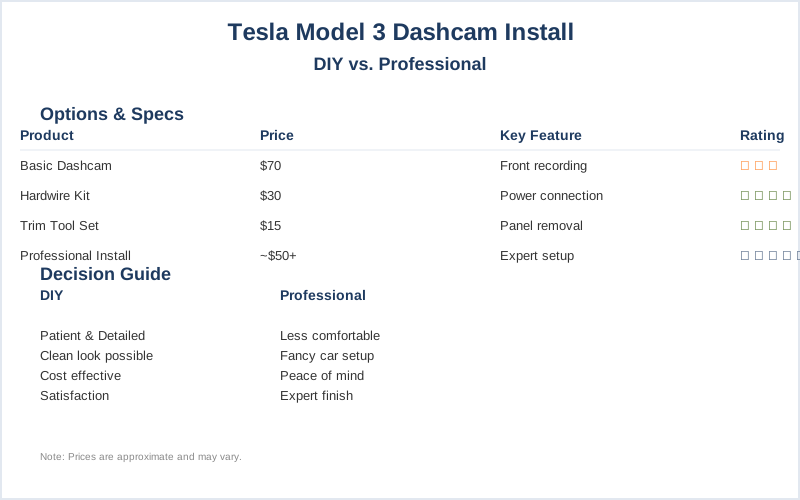
So, the big question: DIY or hire a shop? For my first dashcam install, I was in a tiny apartment complex parking lot, convinced I could just plug something in and be done. Rookie mistake. I ended up with wires dangling like spaghetti and a camera that mysteriously powered off every 10 minutes. That was a $70 dashcam and a $30 hardwire kit from Amazon, and I learned a lot the hard way.Tesla dashcam guide.
Here's the honest version: Most people can handle a DIY install on a Model 3 if they're patient. You can often tuck wires behind trim panels so cleanly that it looks factory-installed. I did this in my old Civic, and it looked way better than I expected. The key is patience and maybe a plastic trim removal tool set, which you can snag for about $15 online. Tesla Motors Club discussion.
If you're not comfortable messing with car interiors, or if your car has a really fancy setup, then paying a professional makes sense. Shops that specialize in car electronics, or even some audio shops, can do this. For a basic front camera, you might be looking at around $50-$100 for labor. Red Tiger Cam cost analysis.
For a dual-camera setup (front and rear), the professional cost jumps to $100-$200, sometimes more if your car is a pain. I saw one forum post where a guy paid $350 to have a fancy system installed in a luxury SUV, and honestly, I'd rather spend that money on gas for a camping trip. Wolfbox installation cost guide.
Teslas, with their integrated screens and sensors, can be a bit trickier. Some installers charge extra for these vehicles, maybe $180-$350, because they need to be extra careful not to mess with the car's electronics. Red Tiger Cam cost analysis.
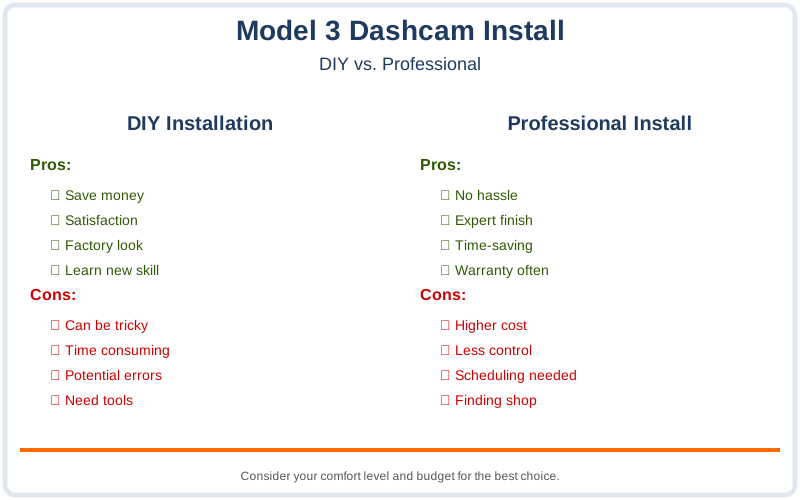
Think about it: for the price of a decent meal out, you can get a kit and spend an afternoon learning. Or, you can pay for an hour or two of labor and have it done. The real move is figuring out which makes you sleep better at night.
I personally like the DIY route because I learn how things work, but I've definitely screwed up enough times to appreciate a pro when the situation calls for it.Tesla Model 3 dashcam fitting.
Why This Matters for Your Setup
Why does this even matter for your Model 3? It boils down to getting a clean install that actually works. If you go the DIY route, you're usually looking to spend about $30-$50 on a hardwire kit if you want parking mode. Wolfbox installation cost guide.
- Hidden Wires: A professional install means no visible wires. They route everything behind panels and under trim, so it looks like it came from the factory. This is crucial in a car like the Model 3 where everything is sleek and modern.
- Power Management: Getting power to the dashcam, especially for parking mode (which records when the car is off), needs to be done correctly. Some people just plug into the 12V outlet, but that means it only records when the car is on. Tesla Model 3 dashcam fitting.
- Sensor Safety: Tesla's have a lot of sensors and cameras built-in. A good installer knows how to work around these without causing interference or voiding any warranties. I've heard stories of people accidentally messing up their radar or cameras with a bad DIY job.
- Clean Aesthetics: Let's be honest, nobody wants a mess of wires hanging from their rearview mirror. A professional job ensures it looks good and doesn't obstruct your view.
- Peace of Mind: If you're not mechanically inclined, paying for an install means you don't have to worry about it not working or causing damage. It's the $50-$200 (or more) insurance policy for your sanity. Red Tiger Cam cost analysis.
Making the Right Choice
So, making the final call on your Model 3 dashcam install? It really depends on your comfort level and how much you value your time and sanity.
- DIY is Game-Time for the Frugal: If you've got a few hours, a YouTube video, and a bit of patience, you can save a good chunk of money. The parts for a DIY setup, like a hardwire kit, might run you around $30-$50.
- Pro Install is for the Time-Strapped: If your weekends are sacred or you'd rather not risk it, paying a professional is your best bet. Expect to shell out anywhere from $50 for a simple front camera install to $200 or more for a dual-cam setup. Red Tiger Cam cost analysis.
- Tesla Specifics Matter: Remember that Teslas can be more complex. Some installers might charge a premium for working on them because of the integrated tech. Teslarati installation example.
- Don't Forget Parking Mode: If you want your dashcam to record even when the car is off, you'll need a proper hardwire kit, which adds to the DIY cost but is often included in professional quotes.