What You Need to Know
Running a dash cam 24/7 without killing your car battery is a common worry, especially if you've ever had that sinking feeling of a dead battery on a cold morning. It's not just about having a fancy gadget; for some, it's about capturing peace of mind on the road. The real question is how to keep it recording those crucial moments without leaving you stranded.
This isn't a theoretical discussion; it's about understanding the power draw and how to manage it. Dash cams are designed to run constantly, which means they draw power even when the engine is off. The trick is managing that draw so your car still starts. Some solutions can power a dash cam for up to 24 hours. It's about finding that balance.
The Core Answer
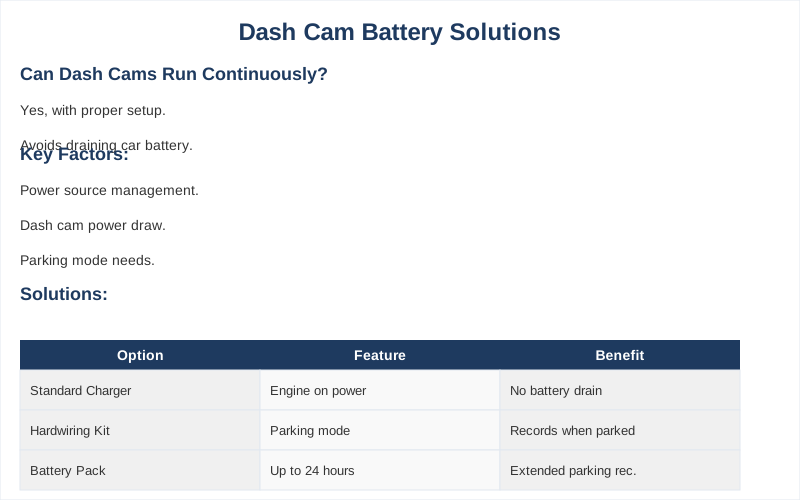
The core answer to whether a dash cam can run continuously without draining your car battery hinges on a few key factors, primarily how the dash cam is powered and its power consumption. If your dash cam is simply plugged into a standard car charger socket, it's likely only getting power when the ignition is on. When the dash cam turns off when you shut down your car, it will not drain your battery.
This is the simplest, most foolproof way to avoid battery drain, but it means no recording when parked. Most car power outlets shut off when the engine is off.
However, many dash cams offer a 'parking mode' that allows them to record even when the car is off. This is where the battery drain concern really kicks in. To enable parking mode without killing your battery, you typically need a hardwiring kit. Dash cams draw power from the car battery when the alternator is not recharging it.
A good hardwiring kit will often include a voltage cutoff feature. This is the game-changer. It monitors your car's battery voltage and automatically shuts off the dash cam if the voltage drops too low, preventing you from being stranded. It's like a smart guardian for your battery. I learned this the hard way after my first attempt to hardwire left me with a dead battery at a campsite in the middle of nowhere.
Some advanced setups use a dedicated dash cam battery pack, like the Blackvue B124X battery. This pack charges while you drive and then powers the dash cam for hours when the car is off, completely bypassing your car's battery for parked recording. It's the $50 version of peace of mind, though some can cost much more.
Another factor is the dash cam's own power draw. Features like a constantly lit screen, Wi-Fi, or GPS can significantly increase power consumption. Turning these off when parked, if possible, is a simple way to reduce the load. Advanced features like Wi-Fi, GPS, lit screen, etc. also take additional power. It's all about managing the draw, not just letting it run wild.
The honest version: If you want continuous parking mode recording, you need a solution that either intelligently manages the power draw from your car battery or uses an independent power source. Just plugging it into the cigarette lighter and hoping for the best is a rookie mistake I made on my second car.
Why This Matters for Your Setup
Why this matters for your setup boils down to preventing that dreaded 'click' when you turn the key. Nobody wants to be that person calling for a tow because their dash cam wanted to be a hero.
- Understanding Parking Mode: This feature is great for catching hit-and-runs or vandalism, but it's the main culprit for battery drain. Unless it enters the parking mode, it won't drain your battery.
- Hardwiring Kits are Your Friend: The real move for continuous recording is a hardwiring kit with a low-voltage cutoff. I spent 20 minutes at a gas station in Ohio trying to figure out if my old Civic would start after a long parking session with a basic adapter - it didn't. These kits prevent the battery from draining too far.
- Battery Packs: The Set-and-Forget Option: If you're not comfortable messing with car wiring (I wasn't, initially), a dedicated dash cam battery pack is a solid alternative. It adds cost, but it's a clean solution. These can power dashcams for up to 24 hours.
- Your Car's Age Matters: An older battery, or one that's not in peak condition, will be much more susceptible to drain. My dad's 15-year-old minivan battery gave up the ghost after just 8 hours of parking mode recording. As the battery gets older, this will get worse.
Making the Right Choice
Making the right choice for your dash cam's power source is less about fancy tech and more about practicality. You need to decide what level of protection you actually need versus what you're willing to deal with in terms of potential battery issues.
- Prioritize Battery Health: If your car is your lifeline and you can't afford a dead battery, stick to powering your dash cam only when the engine is running, or invest in a dedicated battery pack. A fine dash cam will never drain the battery to the point where it can no longer start.
- Hardwiring is King for Parking Mode: For true 24/7 surveillance, a hardwiring kit with a voltage cutoff is the most common and effective solution. I've had mine installed in my truck for over two years without a single dead battery incident. It continues to pull power when the alternator is not recharging.
- Know Your Limits: If you're not mechanically inclined, don't be afraid to have a professional install a hardwiring kit. It might cost $100-$200, but it's cheaper than a new battery or a tow truck. Wiring it directly to the battery isn't something I want to do without knowing what I'm doing.
- Features Cost Power: Be mindful of what features you enable. If you don't need constant Wi-Fi streaming or the screen blazing bright all night, turn it off. Disabling these features reduces the load on the battery.