Where to Start
A dash cam is basically a tiny security guard for your car, always watching. But like any security guard, it needs power. The big question is whether that power draw is going to leave you stranded with a dead battery. I learned this the hard way when my first dash cam, plugged into what I thought was a safe spot, left me looking for a jump start on a Tuesday morning.
It turns out, not all power sources are created equal, and some dash cams are more power-hungry than others. The honest version: it's complicated, but totally manageable if you know what you're doing. Most of the time, a dash cam is not going to be the sole reason your battery dies, but there are definitely ways to screw it up.
The Core Answer
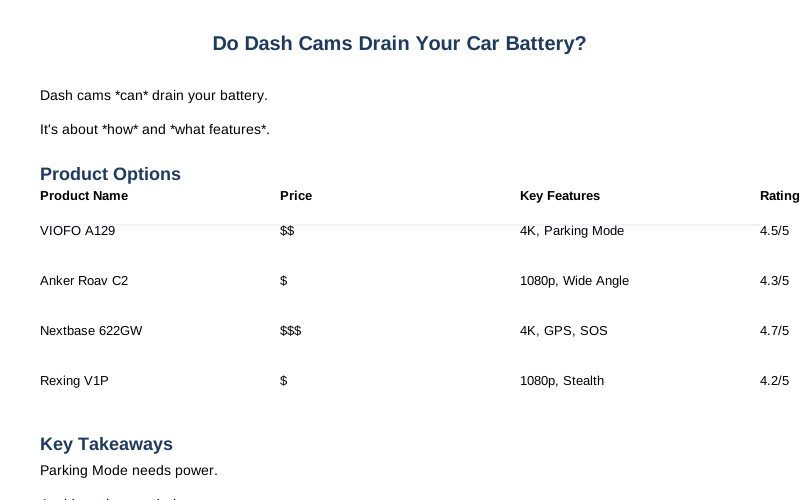
The short answer is: yes, a dash cam can drain your car battery, but it's usually not the device itself, it's how you power it and what features you're using. Think of it like leaving your phone plugged in all the time versus unplugging it. Most dash cams draw very little power when they're just sitting there, especially compared to, say, leaving your headlights on.
The real battery killers are when the dash cam is drawing power continuously, even when your car is off, usually to enable 'parking mode'.
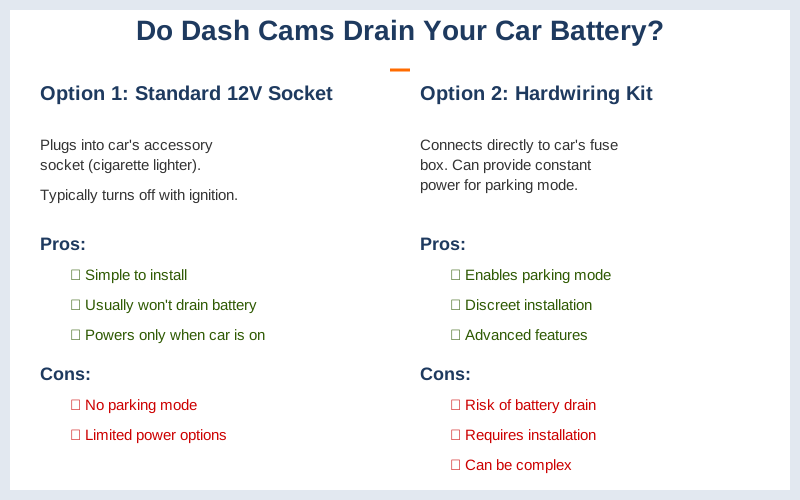
Parking mode is that sweet feature that lets your dash cam record if it detects motion or an impact while you're away. For that to work, the dash cam needs a constant power supply. If you just plug it into a 12V socket that turns off with your ignition, it's not going to do anything when the car is off, and therefore, not drain your battery. Easy peasy.
Some 12V outlets, like the one under the armrest in my old Civic, are actually always powered, which is where the rookie mistake happens. You plug it in, think you're covered, and then your battery is toast.
The other way to power a dash cam is by hardwiring it into your car's fuse box. This is how you get that continuous power for parking mode. This is where things get dicey if you don't know what you're doing. If you wire it to a circuit that's always hot, and you don't have any kind of battery protection, your dash cam will happily drain your battery until it's as dead as a doornail.
I've seen forum posts where people leave their cars for a week or two with a hardwired dash cam and come back to a completely useless battery. Brilliant engineering, right?
There are also dash cams with internal batteries or capacitor-based power. Capacitor-powered ones are better in extreme temps and store just enough juice to save the last recording when the engine cuts out. They can't run long without external power, though. Internal batteries offer a few minutes of recording, which is good for capturing an immediate aftermath, but not for extended surveillance. They still need to recharge from the car.
The real move to avoid battery drain when using parking mode is a dash cam hardwire kit that has a built-in low-voltage cutoff. This is the $50 version that saves you from a $200 battery replacement or a tow truck call. It monitors your car's battery voltage and automatically shuts off the dash cam before it gets too low. It's like a built-in babysitter for your battery.
This is the most common recommendation from people who actually use dash cams daily.
Why This Matters for Your Setup
This matters because nobody wants to walk out to a dead car. My first dash cam was plugged into the 12V outlet in my Subaru Outback that was always on. I didn't know it. That outlet is always powered, which is great for charging your phone on a long trip, terrible for a dash cam that you forget to unplug when you park for more than a day.
I came back from a weekend camping trip to a car that wouldn't even click.
Here's the breakdown:
- If you plug into a 12V socket that turns off with your ignition: You're generally in the clear. No power when the car is off = no drain. This is the simplest, most beginner-friendly approach. It's the easiest way to get started without worrying about battery life.
- If you hardwire your dash cam for parking mode: You absolutely need a solution that prevents over-drain. This usually means a dedicated hardwire kit with a low-voltage cutoff feature. This is what separates the pros from the rookies. Without it, you're playing Russian roulette with your battery.
- Using an external battery pack: This is a great alternative if you don't want to mess with hardwiring or if your car's fuse box is a mystery. It's a separate power source, so your car battery is completely out of the equation. It adds cost and complexity, but it's a safe bet.
Making the Right Choice
Figuring out dash cam power is less about the camera and more about your car's electrical system. The goal is to avoid draining your battery while still getting the footage you need.
- Know your power source: Not all 12V outlets are created equal. Some are always on, some only when the ignition is on. A quick test with a phone charger or a multimeter (if you're feeling fancy) can tell you. Always check that cigarette lighter socket.
- Parking mode requires vigilance: If you want 24/7 recording, you need a plan. A dedicated hardwire kit with a low-voltage cutoff is the game-time decision. It's the real move to prevent dead battery blues.
- Don't overcomplicate it: For most people, just plugging into a 12V socket that turns off with the engine is perfectly fine. It's the simplest way to get started without the headaches. You don't need a fancy setup unless you really want that continuous recording.