SanDisk High Endurance vs Samsung PRO Endurance for 4K Dash Cams: The Battle for Your Windshield
You've just shelled out good money for a shiny new 4K dash cam, the kind that promises crystal-clear footage of every near-miss and parking lot ding. Now you're staring at a wall of SD cards, wondering which one won't crap out on you after a month of continuous recording. When it comes to the heavy hitters for 4K dash cam use, the SanDisk High Endurance and Samsung PRO Endurance cards are almost always at the top of the list. We've seen both recommended widely, and for good reason: they're designed for the relentless write cycles that kill standard memory cards.
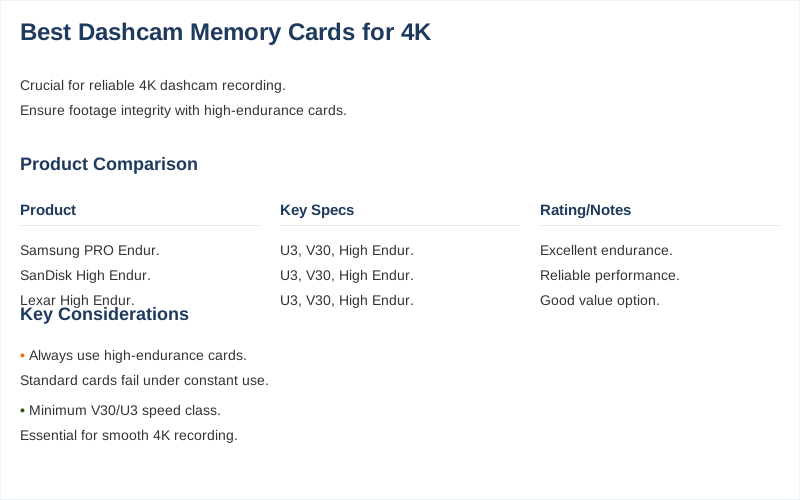
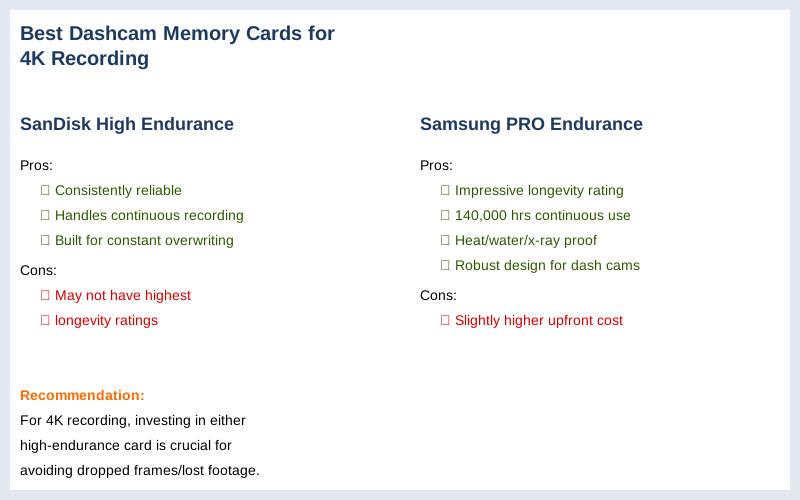
SanDisk's High Endurance line is a solid workhorse. Our customers often get the SanDisk A1, and it's been consistently reliable for us, handling the demands of continuous recording without breaking a sweat. It's built to withstand the constant overwriting inherent in dash cam operation. On the other side, the Samsung PRO Endurance is often touted as a 'daily driver' for dash cams. It's rated for an impressive 140,000 hours of continuous recording, a testament to its robust design, as detailed by Medium. It's also built tough, boasting heatproof, waterproof, and x-ray-proof capabilities, which is exactly what you need when it's baking in your car's windshield.
When we've seen these cards tested, like in comparison videos from WATCH BEFORE YOU BUY, both cards perform admirably, but the Samsung often edges out in sheer longevity ratings. For the demanding environment of a 4K dash cam, where dropped frames mean lost evidence, investing in either of these high-endurance options is non-negotiable. They might cost a bit more upfront, but they'll save you a headache and potential footage loss down the line.
Understanding Speed Classes: V30, U3, and Class 10 for 4K Recording
Ever seen those cryptic letters and numbers like 'U3' or 'V30' on an SD card and just ignored them, hoping for the best? For 4K dash cam recording, ignoring these specs is a surefire way to end up with corrupted files or dropped frames. These aren't just marketing fluff; they're critical indicators of a card's minimum sustained write speed, which is paramount for handling the massive data flow of 4K video.
Let's break it down. Class 10 is the baseline, indicating a minimum write speed of 10MB/sec. While it's been the standard for Full HD, it's simply not enough for 4K. Next up, you have UHS Speed Class 3 (U3), which guarantees a minimum write speed of 30MB/sec. This is where 4K recording starts to become feasible. However, for optimal performance and future-proofing, especially with demanding setups like multi-channel 4K, you really want a Video Speed Class V30 card. The V30 standard also ensures a minimum write speed of 30MB/sec, but it's specifically designed with video recording in mind, offering more consistent performance for high-resolution footage.
Vantrue explicitly states that for 4K, a V30 (Video Speed Class 30) is considered the absolute minimum. Both V30 and U3 effectively mean a minimum sustained sequential speed of 30MB/s, which is what you need to avoid recording errors or dropped frames, as highlighted by Adata. Don't skimp on this; a faster card ensures superior data transfer rates, keeping your 4K footage smooth and reliable.
Capacity Matters: 128GB vs 256GB vs 512GB for Continuous 4K Dash Cam Footage
You've got your 4K camera, now how much digital real estate do you actually need before it starts overwriting your critical footage? The answer isn't always straightforward, as 4K video is a hungry beast when it comes to storage. While a 128GB high endurance card might be ideal for many 1080p setups, 4K demands more.
For a single-channel 4K dash cam, a 128GB card can offer a decent recording loop, but if you're serious about capturing extended periods or have specific recording needs, you'll quickly find yourself wanting more. Moving up to 256GB provides a comfortable buffer, significantly extending the time before the dash cam begins overwriting the oldest files. This is particularly useful if you don't check your footage daily or if you have a longer commute.
However, if your dash cam is recording 4K UHD resolution, uses multiple channels (front and rear), and frequently activates parking mode recording, then a 512 GB micro SD card should definitely be considered, according to BlackboxMyCar. Viofo also recommends a minimum of 64GB for their dashcams, but for 4K, that's just a starting point. Even BlackVue is releasing a 512GB SD card soon, indicating the growing demand for higher capacities for premium 4K setups, as noted on DashCamTalk. The more capacity you have, the longer your recording loop, which means more footage saved before it's gone.
Price Tiers: Budget vs. Mid-Range vs. Premium 4K Dash Cam Memory Cards
Let's be real, your wallet's got feelings too. How much should you really be shelling out for an SD card that's just going to get written over a million times? The good news is that there are options across the price spectrum, but for 4K dash cams, 'budget' doesn't mean 'cheap junk'-it means 'best value for core requirements.'
In the budget-friendly tier, you're looking for cards that meet the minimum V30/U3 speed requirements and offer decent endurance without breaking the bank. These might include lesser-known but reliable brands, or entry-level high-endurance cards from major players. The key here is checking user reviews for sustained performance, as Reddit users often discuss finding the 'best value 4K SD Memory Card'. You won't get the absolute longest lifespan, but you'll get reliable 4K recording for a reasonable cost.
Mid-range cards are where you typically find the sweet spot: excellent performance, enhanced endurance, and a solid reputation. Cards like the SanDisk High Endurance or even a SanDisk Extreme 128GB (which one Reddit user has used for six months without issues) often fall into this category. They provide a significant jump in reliability and longevity compared to budget options, making them a wise investment for most drivers. Finally, the premium tier is dominated by cards like the Samsung PRO Endurance. These cards offer industry-leading endurance ratings, often up to 140,000 hours of continuous recording, as detailed by Medium, and come with robust environmental protections. You're paying for maximum peace of mind and the longest possible lifespan, ideal for professional drivers or those who simply demand the best.
Real-World Performance: SanDisk Extreme Pro vs. Redtiger U3 in 4K
Specs are one thing, but how do these cards actually hold up when your dash cam is cooking in direct sunlight, constantly chewing through 4K footage? That's where real-world performance separates the contenders from the pretenders. It's not just about speed, but about sustained speed and reliability under harsh conditions.
Take the SanDisk Extreme Pro, for instance. While it's often marketed for professional photography, its robust speed and endurance make it a strong candidate for dash cams. One user on Reddit reported using a SanDisk Extreme 128 GB in their dash cam for about six months without a single dropped frame or file corruption, which is a solid endorsement for its real-world reliability. Another user specifically mentioned using a SanDisk ImageMate Pro 128GB microSDXC with their Rove R2-4K, noting its fast performance and compatibility.
On the other hand, brands like Redtiger specifically design their cards for dash cam use. The Redtiger Class 10 U3 SD Card is marketed as being specifically designed for 4K resolution dash cameras, promising extremely fast performance. While direct comparative 'field tests' can vary, the key takeaway from sources like Medium's 'Best Micro SD for Dashcam' articles is that cards purpose-built for endurance and consistent write speeds are the ones that survive the rigors of dash cam life. It's not just about burst speed; it's about maintaining that speed over thousands of write cycles in varying temperatures.
Installation Gotchas and Verification for Dash Cam SD Cards
So you've got the card, you've jammed it in, and now you're hoping for the best. But what if it's not actually working right? Proper installation and verification are crucial steps that many drivers overlook, leading to frustrating issues down the line. It's not just about physically inserting the card; it's about ensuring your dash cam recognizes it and can write to it reliably.
First, always format the SD card *in the dash cam itself* before its first use, and periodically thereafter. This ensures the card is formatted to the dash cam's specific file system, minimizing compatibility issues. Second, be aware that some dash cams can be finicky. For example, the Rove R2-4K dashcam's microSD card compatibility can indeed affect video playback, with users reporting issues with certain microSD cards not working correctly, as discussed on Facebook. Always check your dash cam's manual for recommended card types and sizes.
Finally, verify that your dash cam is actually recording. Most dash cams have an indicator light or an on-screen icon that confirms recording is active. A higher speed class ensures superior data transfer rates, minimizing the risk of recording errors or dropped frames, per ddpai. Before you hit the road, do a quick test recording, remove the card, and check the footage on a computer. This simple step can save you from discovering too late that your crucial 4K footage was never actually saved.
The Definitive Pick: Best 4K Dash Cam Memory Card for Most Drivers
Alright, after all that tech talk about speed classes, capacities, and endurance ratings, what's the bottom line? Which damn card should you actually buy without overthinking it? For most drivers running a single-channel 4K dash cam, who want a blend of reliability, performance, and good value, my definitive pick is the SanDisk High Endurance 256GB microSD card.
Here's why: It consistently delivers the U3/V30 speed class that is considered the minimum for 4K recording, as Vantrue highlights. While 128GB is workable, the 256GB capacity provides a significantly longer recording loop, which is a major advantage for 4K footage that eats up space quickly. It strikes a balance between ample storage and not being overkill for typical daily driving. The SanDisk High Endurance series has proven its mettle in the field, with countless users reporting consistent, reliable performance over extended periods. It's purpose-built for the continuous write cycles of a dash cam, offering far superior longevity compared to standard consumer cards.
If you're running a multi-channel 4K system, frequently use parking mode, or simply want the absolute longest lifespan possible, then upgrading to a 512GB card, potentially the Samsung PRO Endurance for its exceptional 140,000-hour rating, as documented by Medium, is a wise move. But for the vast majority of drivers, the SanDisk High Endurance 256GB is the smart, reliable choice that won't leave you questioning your footage when it matters most. It's the workhorse that gets the job done without fuss, ensuring your 4K evidence is always there.