Setting the Scene
Installing a dash cam in your new 2026 Kia Camper Van isn't as scary as it sounds, even if you've only ever wrestled with a stubborn tent pole. My first attempt involved a tangled mess of wires and a prayer that I wouldn't short out the entire electrical system.
This whole dash cam thing can feel intimidating with all the talk of fuse boxes and power sources, but I've learned that it's mostly about understanding how your vehicle gets its juice. Think of it like finding the right plug for your campsite's power hookup - you just need to know which outlet is live and when.
We're going to break down the options so you can get that extra set of eyes on the road without pulling your hair out.
The Core Answer
The core answer to installing a dash cam in your 2026 Kia Camper Van comes down to how you get power to it. You have a few main routes, and frankly, some are a lot less headache-inducing than others.
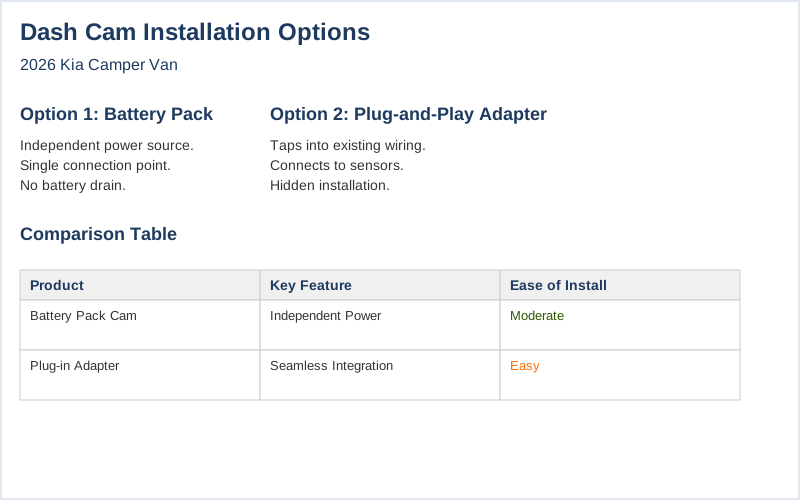
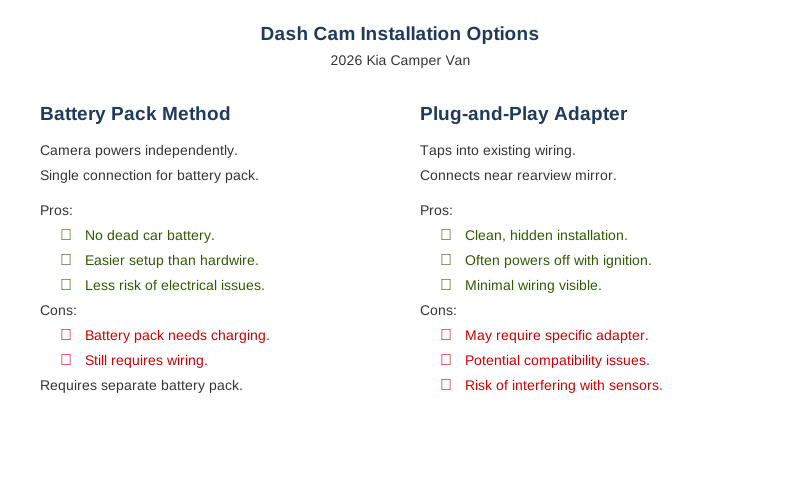
The easiest way, and the one I stumbled onto after trying to hardwire something and blowing a fuse, is using a dash cam that comes with its own battery pack. This is a game-changer because it lets you power the camera independently. You still need to wire the battery pack itself into your car's power, but it's a single connection point and it doesn't directly drain your vehicle's battery.
My first trip with one of these, I didn't have to worry about waking up to a dead car battery after running the dash cam all night.
Another popular method, especially for Kia models, is using a plug-and-play adapter that taps into existing wiring. Some systems connect directly to your lane keeping system or other sensors near the rearview mirror. This is often advertised as 'hidden wiring' and 'plug to plug.' The real move here is that it avoids messing with the fuse box, which is where I made my first rookie mistake by grabbing the wrong fuse slot and killing my radio.
For my 2026 Kia, I'd be looking for one of these.
Then there's the old-school method: tapping into the fuse box. This is where you'll need to be a bit more careful. You can get fuse taps that let you safely draw power from a circuit that only turns on when the ignition is on. This YouTube video shows taking 12v from the fuse box with the ignition on.
The honest version is, if you're not comfortable with basic electrical stuff, this is where you might want to pay a professional, or at least have a friend who knows their way around a multimeter. I once spent 30 minutes trying to figure out which fuse was which on a dark campsite, armed with only a flashlight and a vague sense of dread.
Finally, some people opt for a dedicated dash cam hardwiring kit that includes a battery pack and a fuse tap. This is a solid approach if you want the camera to record even when the car is off (parking mode) without draining your main battery. You'll still need to connect the battery pack's charging wire to an ignition-switched fuse, and its ground wire to a solid chassis ground.
The trick is finding a spare fuse slot so you don't mess with your car's original wiring. Brilliant engineering, really, if you can find the right slot.
What nobody tells beginners is that most of these setups require a little bit of trim removal to hide the wires neatly. It's usually just a few clips. My first time, I ended up with wires dangling down the A-pillar, looking like a Christmas tree that had a rough night. The goal is to make it look like it came from the factory, not like you just finished a DIY disaster.

Why This Matters for Your Setup
Why this matters for your setup is pretty straightforward: a poorly installed dash cam can be more trouble than it's worth.
- Wire Management: The biggest win is keeping your wires tidy. I learned this the hard way when my rearview mirror mounted camera's power cord kept snagging on my sun visor, nearly ripping it out on a long drive. OEM-style hidden designs are key here.
- Power Draw: You don't want your dash cam to kill your car battery. This is crucial, especially if you plan on using parking mode.
Using a dedicated battery pack or ensuring your hardwire setup only draws power when the ignition is on prevents that dreaded 'click, click, click' of a dead battery. is where understanding power options is vital.
- Fuse Box Follies: Accidentally pulling power from the wrong fuse can disable anything from your headlights to your infotainment system. I once unplugged my entire dashboard thanks to a misplaced fuse tap.
Proper fuse box identification is non-negotiable.
- Reliability: A loose wire or a bad connection means no footage when you need it most. I had a dash cam that would randomly cut out on bumpy roads, which was incredibly frustrating. A secure installation means reliable recording. Getting power for it correctly is the first step to reliability.
Making the Right Choice
Making the right choice for your dash cam installation boils down to a few key things:
- Simplicity First: For beginners, plug-and-play options that use existing connectors are usually the least stressful. They often require no fuse box interaction and can be installed in under 15 minutes.
- Battery Packs are Your Friend: If you want parking mode or just peace of mind, a dash cam with its own battery pack is a smart move. It isolates the camera's power needs from your vehicle's.
This setup is designed for independent operation.
- Know Your Limits: If you're not comfortable with car electrics, don't be afraid to get a professional to hardwire it. The cost of a shop installation is usually less than fixing a mistake from a rookie wiring job. Videos exist to guide you, but professional help is always an option.
- Hide Those Wires: No matter how you power it, take the extra 10 minutes to tuck those wires away.
It makes a huge difference in the overall look and prevents them from becoming a hazard. My trunk was so full on my first trip I couldn't see out the rear window; let's not make that happen with wires.