The Big Picture
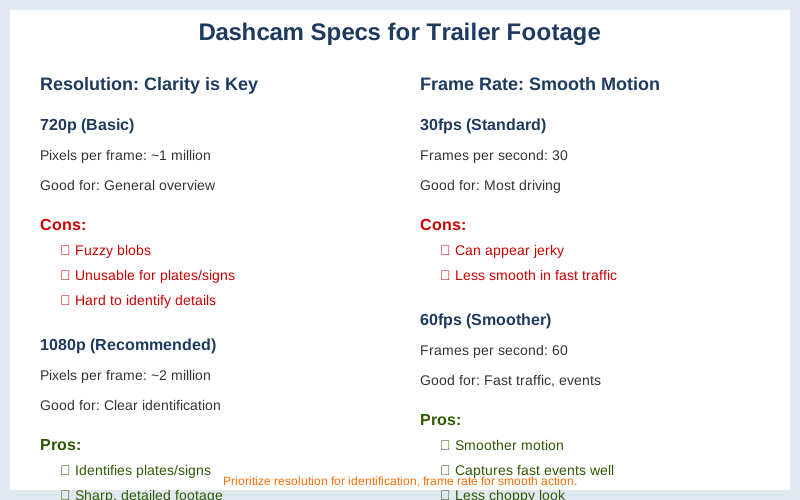
Understanding dashcam resolution and frame rates is about getting video clear enough to actually prove what happened. My first dashcam was a $50 impulse buy that recorded fuzzy blobs. I learned the hard way that 720p resolution is basically useless for identifying anything beyond the car in front of you. If you need to make out a license plate or a street sign, you need to pay attention to these specs.
It's not just about a higher number; it's about what that number actually means for your footage when you need it most. This isn't rocket science, but it is important for making sure your dashcam isn't just a blinky light on your dashboard. Guide to Dash Cam Video Resolutions
The Core Answer
Dashcam resolution is all about the number of pixels in each video frame. Think of it like building a mosaic; the more tiny tiles (pixels) you have, the sharper and more detailed the final picture will be. Higher resolutions, like 1080p (1920x1080 pixels) or even 4K (3840x2160 pixels), mean you can zoom in on footage and still make out crucial details like license plates or faces Guide to Dash Cam Video Resolutions.
My first dashcam was a grainy 720p nightmare where I couldn't even tell if the other car was red or orange. Resolution is king if you need to identify specific things Dash cam owners, Resolution vs Framerate?.
Frame rate, on the other hand, measures how many still images, or frames, your camera captures per second (fps). A higher frame rate, like 60fps, makes motion look smoother and more fluid. This is super useful for capturing fast-moving traffic or sudden events without that jerky, choppy look. If a car suddenly cuts you off, 60fps can make that split-second maneuver much clearer 4K or 60 FPS for Dash Cam.
Most dash cams let you choose between different settings. You'll often see options like 4K at 30fps or 1440p at 60fps. Very high-end units might offer 4K at 60fps, but that's still rare and eats up storage like crazy. The real move is understanding what you prioritize. For me, identifying a license plate in a fender bender is more critical than a super-smooth video of a traffic jam Is frame rate important for dash cam footage?.
If you're looking for the $50 version, 1080p at 30fps is usually the baseline. It's decent, but you might struggle with details in low light or at a distance. Game-time decision: If you anticipate needing to zoom in for evidence, prioritize resolution. If your main concern is capturing smooth motion in busy, fast-paced city driving, a higher frame rate becomes more important Which video resolution is good to have for dash cam?.
Higher resolution footage also takes up more storage space. A 4K video file is significantly larger than a 1080p file, so you might need a bigger memory card or less recording time before it overwrites older footage. This is the kind of stuff nobody tells beginners when they're just trying to get a camera mounted. Guide to Dash Cam Video Resolutions
Lower resolutions can sometimes have higher frame rates on cheaper models, and vice-versa. It's a trade-off. What nobody tells beginners is that you can't always have both the absolute highest resolution and the absolute highest frame rate on the same camera without paying a premium. Is frame rate important for dash cam footage?
Why This Matters for Your Setup
Why this matters for your setup boils down to what you actually need your dashcam to do.
- Identifying Crucial Details: If your primary goal is to capture clear evidence, like license plates or road signs, higher resolution is your friend. I once had to zoom into a clip from my old dashcam to read a partial plate, and it was just a blurry mess. Resolution above 1080p, especially 1440p or 4K, will give you that clarity Guide to Dash Cam Video Resolutions.
- Capturing Smooth Motion: For busy highways or areas with lots of fast traffic, a higher frame rate (like 60fps) makes motion look much smoother. It helps reduce blur in fast-moving objects, making it easier to see exactly what happened during a quick incident 4K or 60 FPS for Dash Cam.
- Storage vs. Quality: Higher resolution and higher frame rates both consume more storage space. A 4K 60fps video file is massive compared to a 1080p 30fps file. You need to decide if you want longer recording times on a smaller memory card or the absolute best quality with shorter recording loops Guide to Dash Cam Video Resolutions.
- The "Good Enough" Scenario: For many drivers, 1080p at 30fps is perfectly adequate. It captures enough detail for most common incidents and strikes a good balance between quality and file size. This is the $50 version that gets the job done without breaking the bank Which video resolution is good to have for dash cam?.
Making the Right Choice
Making the right choice between resolution and frame rate is about balancing your needs and your budget.
- Prioritize Resolution for Evidence: If you need to identify specific details like license plates, faces, or signs, aim for the highest resolution your budget allows. 1080p is a minimum, but 1440p or 4K offers significantly more detail Guide to Dash Cam Video Resolutions.
- Consider Frame Rate for Smoothness: For areas with high-speed traffic or if you want the smoothest possible video, a higher frame rate like 60fps is beneficial. It makes fast movements clearer and reduces blur 4K or 60 FPS for Dash Cam.
- Understand the Trade-offs: Remember that higher resolution and frame rates mean larger file sizes. This impacts how much footage you can store on your memory card. Plan accordingly with a larger card if you opt for top-tier settings Guide to Dash Cam Video Resolutions.
- Don't Overcomplicate It: For most everyday drivers, 1080p at 30fps is a solid, reliable choice that provides good quality video without overwhelming your storage or your wallet. It's the honest version of what most people actually need Which video resolution is good to have for dash cam?.