Where to Start
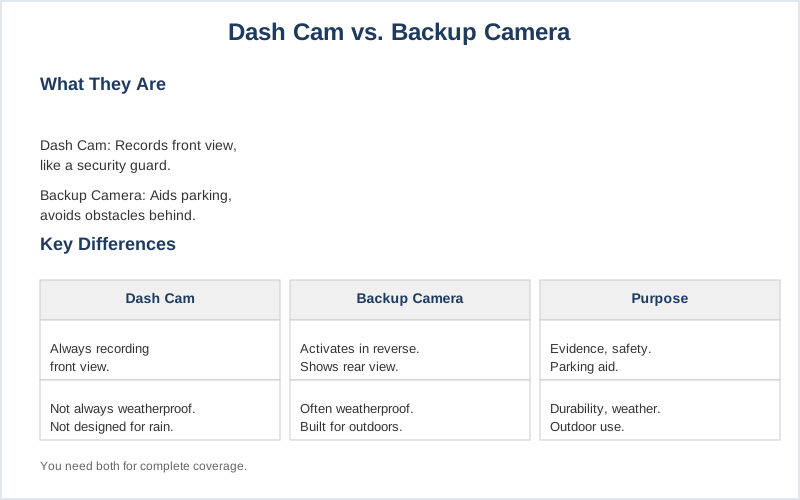
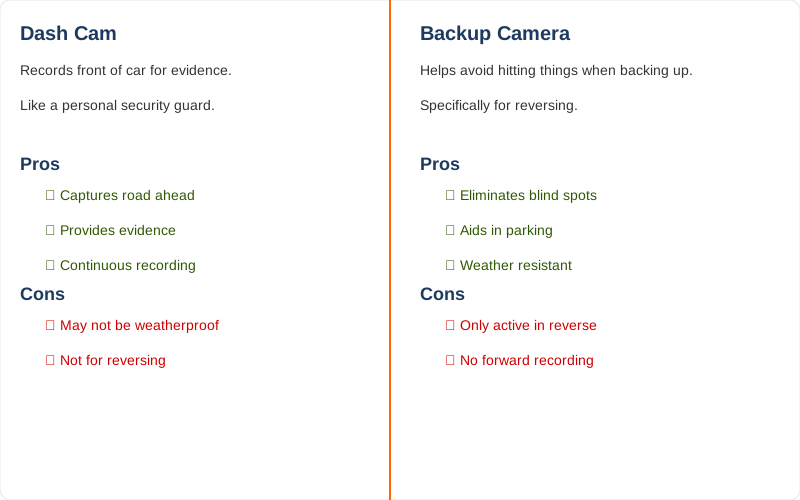
A dash cam records everything happening in front of your car, like a personal security guard for your windshield. A backup camera, on the other hand, is specifically designed to help you avoid hitting things when you're backing up. They both use cameras, but their jobs are totally different. Think of it like this: one is a witness, the other is a spotter.
The YouTube Shorts put it plainly: you still need a dash cam even if you have a backup camera. One captures the road ahead for evidence, the other shows you what's directly behind your bumper. What nobody tells beginners is that a dash cam often isn't weatherproof like a dedicated reversing camera, which is a pretty big deal if you plan on using it in the rain.
My first thought was 'can't one do both?', but the real answer is more complicated.
The Core Answer
The core difference boils down to purpose and activation. A dash cam is your always-on road recorder. It's mounted to capture continuous footage of what's happening in front of your vehicle, or sometimes both front and rear, for evidence in case of an accident or incident. Think of it as a black box for your car. Front dash cams are built for this, constantly documenting your drive.
I remember one trip through a sudden downpour in Pennsylvania; my dash cam caught a car swerving wildly into my lane, which was crucial for the insurance claim later. The honest version is, without that footage, it would have been my word against theirs.
A backup camera, however, is a much more specialized tool. It only kicks in when you put your car in reverse. Its sole job is to give you a clear view of what's directly behind you, eliminating blind spots and helping you avoid bumping into things. Studies show backup cameras can reduce reversing accidents by a solid 46%. The real move here is that it's designed for low-speed maneuvering, often with parking guidelines overlaid on the screen.
My first car didn't have one, and parallel parking in Chicago was a nightmare. I learned to rely on my mirrors and a lot of guesswork, which is not ideal.
Some dash cams offer a rear-facing camera option, and this is where things can get confusing. While a rear dash cam records what's behind you, it's still generally operating as a dash cam - recording continuously for evidence. It's not usually designed to activate automatically with your reverse gear like a dedicated backup camera. The folks on Reddit often point out that aiming a dash cam downward for reversing isn't its primary design.
You might get a view, but it's not optimized for that specific task. My friend tried to use his rear dash cam as a backup camera, and the angle was all wrong, making it hard to judge distances accurately. Brilliant engineering, not.
So, the key takeaway: a dash cam is for recording events, while a backup camera is for assisting with reversing. You can't typically swap one for the other and expect optimal performance. A rear view camera, often integrated into a mirror dash cam, can provide a constant feed from the rear, reducing blind spots while driving, but it still isn't the same as a dedicated backup camera's reverse-only function with parking aids.
Why This Matters for Your Setup
- Proof of Incident: A dash cam captures footage of accidents, hit-and-runs, or even road rage incidents. This is game-time evidence for insurance claims or police reports. My dash cam caught a fender bender on I-80 in Ohio that saved me a lot of hassle.
- Parking Assistance: While a dash cam's primary job isn't parking, a rear-facing dash cam can offer some visibility behind your vehicle, though it lacks the specific guidelines and automatic activation of a backup camera.
It's better than nothing, but not ideal.
- Security and Deterrence: Dash cams can record vandalism or break-ins when your car is parked. The idea that a visible camera might deter a thief is a big plus for me.
- Peace of Mind: Knowing you have a recording of your drives can reduce stress.
It's like having an extra set of eyes watching out for you.
- Mandatory Requirements: Some regions or insurance companies might even recommend or require dash cams for certain types of vehicles or drivers. This YouTube video highlights that while they serve different purposes, both add layers of safety.
Making the Right Choice
- Dash Cam: Think of this as your car's journalist, always recording what's happening in front (and sometimes behind) for evidence. It's for documenting events and proving what happened.
- Backup Camera: This is your parking instructor, activating only when you shift into reverse to help you avoid obstacles. It's for safe maneuvering.
- Combined Systems: Some dual-camera systems offer both front and rear recording, but double-check if the rear unit functions as a dedicated backup camera or just a continuous rear recorder.
- The Honest Version: For most people, you need both if you want full coverage. A dash cam for the road ahead and a backup camera for safe parking. Trying to make one do the job of both is usually a rookie mistake that compromises functionality.
- My Experience: I learned the hard way.
Initially, I thought a rear dash cam was enough for reversing, but the lack of clear visual aids and automatic activation made backing out of tight spots in my old apartment complex a constant gamble.