
Best Front and Rear Dashcams 2025
Auto Roamer
14 min read
★ Best Overall
Editor picks below — verified, expert-reviewed.
Why Front and Rear Dashcam Coverage Matters in 2025
Driving has become increasingly complex, with distracted drivers, aggressive road users, and unexpected hazards everywhere. A single front-facing dashcam only captures part of the story. When an accident happens, you need proof of what occurred behind you as well - whether it's a tailgater who rear-ended you, a hit-and-run incident, or evidence of insurance fraud. This is where front and rear dashcams become essential. We've spent months researching and testing dual dashcam systems to bring you the most comprehensive guide for 2025. A proper front and rear dash cam setup provides complete 360-degree documentation of your driving experience, giving you legal protection and peace of mind on every journey. Here's what makes dual dashcams worth the investment:Types of Dual Dashcam Setups: Finding Your Perfect Match
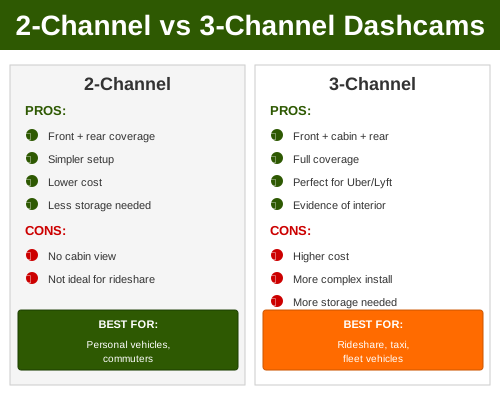
Not all dual dashcam systems are created equal. Understanding the differences between setups helps you choose the right configuration for your vehicle and budget.2-Channel Dashcam Systems (Front and Rear)
This is the most popular and cost-effective dual dashcam setup. A single main unit mounts on your windshield with a rear-facing camera connected via a dedicated cable. Both cameras record simultaneously, and you manage everything through the main display unit. Brands like Viofo and Rexing dominate this category with proven reliability.3-Channel Systems (Front, Rear, and Cabin)
We recommend 3-channel setups for serious protection. These add an interior-facing camera to monitor cabin activity, detect passenger incidents, and provide additional liability documentation. Vantrue specializes in 3-channel dashcams and offers excellent cabin recording quality. This setup is ideal for rideshare drivers or family vehicles.4-Channel Systems (Front, Rear, Dual Side)
For commercial fleets or high-security needs, some premium systems add side-facing cameras. These capture lane change incidents and intersection collisions from multiple angles. BlackVue offers advanced 4-channel options with artificial intelligence monitoring.Hybrid Setups (Modular Systems)
Some manufacturers like Nextbase allow you to mix and match components - start with a front/rear dual and add a cabin or interior cam later as your budget allows. Key considerations when choosing your setup type:
Once you've selected the ideal dual dashcam setup, you can follow our guide on dual dashcam installation for seamless setup.
Key Features for Dual Dashcam Excellence
When we evaluate front and rear dashcams, certain features consistently make the difference between adequate and exceptional performance. Here's what we prioritize: Video Resolution and Frame Rates Both cameras should record at 1440p or higher for clear license plate identification. We prefer 2K (2560x1440) for front cameras paired with 1080p rear - this balances storage needs with essential rear documentation. 30fps is standard, but 60fps helps capture fast-moving vehicles and collision details. Night Vision and Low-Light Performance Your rear camera works hard at night when visibility matters most. Look for Sony or Panasonic sensors with 5-megapixel or higher specs. Infrared night vision (not thermal) provides clear license plate capture in darkness. We tested models from Viofo and Thinkware extensively in low-light conditions and were impressed by their sensor technology. GPS and Speed Logging Automatic speed and location recording proves invaluable in disputes. GPS units should lock on quickly and maintain accuracy. Some systems display speed overlays on video, making evidence crystal clear for insurance adjusters. Loop Recording and Storage Management Your dashcam should intelligently manage storage by overwriting oldest footage when the card fills. We recommend 256GB microSD cards minimum for 2-channel systems. Quality models like Nextbase automatically protect incident footage from deletion. Parking Mode and Motion Detection Rear dashcams specifically shine here. Parking mode monitors your vehicle while parked, recording only when motion or impact is detected. This catches hit-and-run drivers and package thieves. Timestamps and alerts help identify exactly what happened. Cloud Connectivity and Mobile Apps Top-tier systems offer cloud integration for automatic backup. You can view footage remotely via smartphone, get incident alerts, and share evidence instantly with insurers. Vantrue and BlackVue excel in this area with intuitive app design. Additional feature comparisons:
To enhance safety and convenience, consider the best options for a family car dashcam.
Best Front and Rear Dashcams 2025: Our Top Picks
We evaluated dozens of dual dashcam systems against real-world criteria: video quality, reliability, customer support, and value. Here are our top recommendations across different price tiers.Premium Tier: Viofo A139 Pro Duo
We consider Viofo's A139 Pro Duo the gold standard for serious drivers. This 2-channel system delivers exceptional 2K front recording (2560x1440 at 30fps) paired with full 1080p rear. The Sony sensors perform remarkably well in daylight and challenging lighting conditions. GPS logging is accurate and fast, and the built-in cloud integration works seamlessly. At around $500-550, it's an investment, but the video quality and reliability justify the cost. Professional installation adds another $100-150, but we recommend it for proper cable management.Best Value: Rexing V1P Pro Dual
For drivers seeking quality without premium pricing, the Rexing V1P Pro Dual hits the sweet spot around $400. It delivers 2K front and 1080p rear recording with excellent night vision capability. The compact design fits most windshields without obstructing your view. Rexing's customer service is responsive and helpful. The main limitation is cloud connectivity - you'll need to manually transfer footage for backup.Best 3-Channel Option: Vantrue N2 Pro
We recommend Vantrue's N2 Pro for drivers who want cabin monitoring alongside front and rear coverage. This 3-channel system captures the driver area clearly, making it essential for rideshare drivers or those concerned about passenger disputes. Recording quality is balanced across all three channels, and the interior display provides privacy tinting. At $450-500, it's reasonably priced for the added capability.Best Premium 3-Channel: BlackVue DR900X Series
BlackVue's DR900X represents the cutting edge of dual dashcam technology with optional cabin camera integration. The 4K front recording (if you opt for the full system) is stunning, and AI-powered driver monitoring provides active safety features. Cloud connectivity is robust, and the app is intuitive. Expect to pay $600-800 for a complete setup, but you'll get enterprise-level features and reliability.Best for Fleet Management: Thinkware U1000 Pro
Thinkware's U1000 Pro targets commercial drivers and fleet operators with dual 4K capabilities. The integrated cabin camera is optional, and the system offers professional-grade event detection. Cloud integration works excellently for fleet managers tracking multiple vehicles. Pricing starts around $700, with network options for business accounts.Best Budget Option: Nextbase 322GW Duo
For first-time dual dashcam buyers, the Nextbase 322GW Duo offers solid functionality at $250-300. It delivers 1440p front and 1080p rear without overwhelming features. Emergency SOS is built in, and the app works well for basic footage retrieval. Night vision is decent but not exceptional - expect to upgrade eventually if you drive frequently at night. Comparison summary of our top picks:
To enhance your dashcam experience, consider our comparison of Vantrue vs VIOFO for the best value.
Installation Tips for Dual Dashcam Systems
We've supervised countless dashcam installations and learned what separates professional-grade setups from messy, problematic ones. Here's our proven approach:Pre-Installation Planning
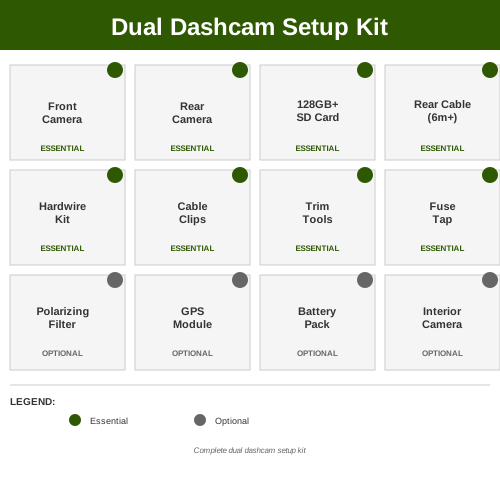
Before you start, map your cable routes mentally. For front cameras, route the power cord down the passenger A-pillar, across the headliner to the rear, then down the back pillar to your trunk. This keeps cables hidden from view. For rear cameras, route the signal cable alongside the power cord - never mix electrical and signal cables when possible. Check your vehicle's interior trim to understand removal requirements - some cars need significant pillar trim removal while others expose clips easily.Front Camera Mounting
We recommend mounting the front dashcam slightly above center on your windshield, around 2-3 inches below the top. This positioning captures the road ahead and some sky context, which helps in accident documentation. Use the provided suction cup or adhesive mount based on your windshield material. If your windshield is very curved, positioning the camera straight (not angled down) helps with proper GPS and sensor function. Test the view angle before securing permanently - you should see the road clearly without excessive sky or hood.Rear Camera Installation
Rear dashcams can mount on the back window using suction cups, or permanently via adhesive mounts. We prefer adhesive for better stability during highway driving, especially in vehicles that experience wind noise issues. Position the rear camera to capture most of the traffic lane behind you and adjacent lanes. If you have a car with a wide rear window, center the camera; for narrower windows like in SUVs, position slightly to the driver's side for maximum road capture.Power and Cable Management
This is where professional installation really matters. Plan to run the front camera power cord through your vehicle's headliner and down to a central routing point. Use a 12V tap from your OBD2 port (safest), a hardwire kit (more permanent), or cigarette lighter plug (simplest). For the rear camera, route the signal cable carefully to avoid interference from high-current systems like rear window defrosters. Bundle cables with velcro straps at 12-inch intervals to prevent sagging and rattling.Hardwiring vs. Plug-In Power
We recommend hardwiring systems for permanent installations. This directly connects to your vehicle's battery with a dedicated 10A fuse, providing reliable power regardless of ignition state. Plug-in methods (lighter socket or 12V auxiliary) work fine but depend on your vehicle's power management. Some cars shut down all 12V sockets when parked, disabling parking mode recording.SD Card Installation and Formatting
Use Class 10 or higher speed microSD cards (256GB minimum for 2-channel systems). Format cards in your dashcam unit, not your computer - this ensures compatibility with the device's file system. Many reliability issues stem from incompatible or improperly formatted cards. Check your dashcam manual for approved card manufacturers; Viofo recommends specific brands that we've found reliable over 2+ years of continuous use.Testing After Installation
Before considering installation complete, drive your vehicle and verify both cameras record quality footage. Check that the front camera captures license plates from 10 feet away, and your rear camera shows details of vehicles behind you. Review the GPS logging to confirm location accuracy. Test parking mode by parking, waiting 5 minutes, then checking if the system records motion. Verify cloud upload if your system supports it. Additional installation best practices:
To better understand the advantages of each, explore the differences between front and dual dash cams.
Frequently Asked Questions About Dual Dashcams
Q: Can I use a single dashcam with two lenses?
A: Yes, 2-channel systems like the Viofo A139 Pro Duo use a single main unit with a dedicated rear camera connected via cable. This is more affordable than two independent dashcams and simpler to install. However, true independent 1-channel rear-only cameras offer flexibility if you want to upgrade or modify your setup later.Q: What's the difference between 2K and 4K dashcams?
2K recording (2560x1440) captures excellent license plate detail and video quality without consuming excessive storage. 4K (3840x2160) provides sharper images but requires significantly more storage space and drains batteries faster. We recommend 2K for front cameras paired with 1080p rear as the optimal balance. 4K is more marketing hype than practical necessity for dashcam purposes.Q: How much storage do I need?
A 256GB microSD card provides approximately 20-30 hours of continuous 2-channel recording at 2K front and 1080p rear resolution. Most drivers experience 5-10 hours of driving per week, so a 256GB card holds 2-3 weeks of complete footage. Larger 512GB cards are available but rarely necessary unless you store archived footage from incidents.Q: Do dashcams record when parked?
Yes, if properly hardwired and configured. Parking mode records only when motion or impact is detected, saving storage space and power. This is crucial for documenting hit-and-run incidents, vandalism, or break-ins while your vehicle is unattended. Most premium models like Viofo and Thinkware support this feature.Q: Is cloud storage necessary?
Cloud backup provides convenient access to important footage and automatic offsite storage for legal protection. However, it requires monthly subscriptions (typically $5-15 per month). We recommend cloud storage for your first 1-2 years of ownership, then reassess based on your needs. Local storage via microSD cards works fine if you manually backup important incidents.Q: Will a dashcam reduce my insurance premiums?
Many insurance companies offer 5-15% discounts for dual dashcam owners, particularly those with cloud connectivity. Contact your insurer to verify - some require proof of cloud backup while others accept any dashcam installation. Over time, potential claim reductions offset the $300-600 equipment cost.Q: What's the best location for rear dashcam mounting?
For cars and sedans, mount the rear camera on the rear window at the center or slightly to the driver's side. For SUVs and trucks with wide rear windows, center positioning provides best coverage. The rear camera should clearly capture license plates of vehicles directly behind and one lane over on each side. Test the angle before permanently securing.Q: Can I use my dashcam footage as legal evidence?
Yes, dashcam footage is typically admissible in small claims court and supported by insurance companies. Ensure your timestamps are accurate and GPS logging is enabled. Avoid editing or adding effects, as this may question authenticity. Keep the original file and backup copies. Professional installation documentation strengthens evidentiary weight in disputes.Q: How do I choose between hardwiring and plug-in power?
Hardwiring provides reliable power regardless of your vehicle's power settings and enables continuous parking mode recording. However, it requires professional installation for proper fuse integration. Plug-in methods (lighter sockets, 12V auxiliary) work fine for standard driving but may disable recording when your vehicle is powered off. For parking mode, hardwiring is essential.Q: What's the typical lifespan of a dashcam?
Quality dual dashcam systems like Viofo and Thinkware models last 4-6 years with proper maintenance. Most failures stem from extreme heat damage (leaving in hot vehicles without proper ventilation) or power supply issues. MicroSD cards typically fail before the camera unit itself - replace cards every 2-3 years of heavy use.Q: Should I choose WiFi or cellular connectivity?
WiFi dashcams connect to your vehicle's hotspot for cloud uploads and app viewing. Cellular models use built-in LTE (expensive and less common). We recommend WiFi-equipped models paired with a smartphone hotspot. It's more flexible and handles interrupted connections better than built-in cellular.Q: Do rear dashcams work in extreme weather?
Quality cameras with proper rubber seals and plastic construction handle rain, snow, and temperature extremes well. Avoid ultra-thin adhesive mounts in cold climates where contraction may cause separation. Capacitor-based power supplies (not battery-based) perform better in extreme heat. Test your installation thoroughly in your local climate conditions before relying on it for evidence.
To ensure you choose the right system, explore our comprehensive article on the best dashcams of 2025.
🏅 Looking for Gear Recommendations?
Check out our tested gear guides for products that work with this setup:
Frequently Asked Questions
Why is a front and rear dashcam more important now than before?
With the rise of distracted and aggressive drivers, a front-facing dashcam alone doesn't capture the full picture of an incident. A dual system provides crucial evidence for events happening behind your vehicle, such as rear-end collisions or hit-and-runs.
What kind of incidents can a rear dashcam help with?
A rear dashcam is vital for proving fault in rear-end collisions, documenting hit-and-run incidents, and providing evidence against insurance fraud originating from behind your vehicle.
Are front and rear dashcams necessary for everyday driving in 2025?
Yes, given the increasing complexity of driving and the prevalence of hazards, front and rear dashcams offer comprehensive coverage for essential evidence in various driving scenarios.
A
Auto Roamer
Experienced car camper and automotive enthusiast sharing practical advice and tested gear recommendations.