
Understanding Wireless Rear Camera Signal Strength and Interference
My first backup camera was a $50 Amazon special that flickered more than a cheap motel sign. It was installed on my beat-up minivan for a trip to the Smoky Mountains, October, and the temperature dropped like a rock after sunset.
My first backup camera was a $50 Amazon special that flickered more than a cheap motel sign. It was installed on my beat-up minivan for a trip to the Smoky Mountains, October, and the temperature dropped like a rock after sunset. By 9 PM, the screen was showing static more than my driveway. Turns out, electronics don't love the cold, and neither does a weak signal.
This isn't about fancy tech specs; it's about what actually works when you're trying to back into a tight campsite with kids running around. What nobody tells beginners is that a wireless signal is like a fickle friend - it can bail on you when you need it most.
The real move here is understanding why that static happens and how to stop it before you scrape your bumper.
It's not rocket science, it's just understanding how radio waves play nice (or don't) with other gadgets in your car. This is the game-time stuff I learned the hard way so you don't have to.
The Core Answer
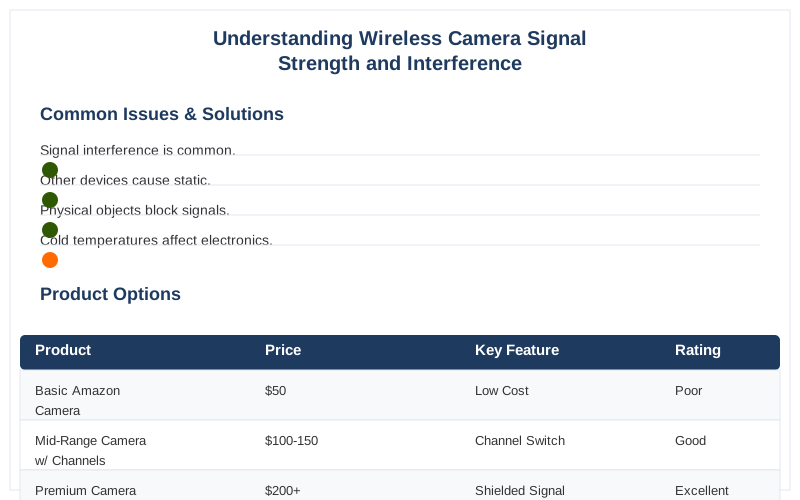
So, why does your wireless backup camera suddenly decide to go on strike? It's usually a battle for airwaves, plain and simple. Think of your car as a tiny city, and your wireless camera is trying to send a signal across town. If there are too many other radios talking on the same frequency, your camera's message gets lost in the noise. This is called signal interference, and it's the main culprit behind those annoying black screens or static bursts.The biggest offenders are other wireless devices. Your car is basically a rolling Wi-Fi hotspot these days. Bluetooth devices, tire pressure monitoring systems (TPMS), even some aftermarket car stereos can blast signals on frequencies that mess with your camera. I once had my TPMS light up like a Christmas tree every time I put my camera in reverse. Turns out, they were fighting over the same 2.4 GHz band. The fix? Sometimes it's just switching camera channels, if yours even has that option.
Physical stuff also gets in the way. Metal is a big one. The frame of your car, exhaust pipes, even a spare tire can act like a shield, blocking the signal. I learned this the hard way trying to mount a camera on the back of my camper van. The sheer amount of metal between the camera and the receiver unit was a nightmare. The honest version: if there's a lot of metal between the transmitter and receiver, you're asking for trouble.
Distance is another enemy. Wireless cameras have a range, and pushing beyond it is asking for a dropped signal. My first camera had a "100-foot range" claim that lasted about 20 feet in real-world conditions, especially with my RV. The manufacturer's specs are often optimistic. The real move is to test your camera's range *before* you need it for a tricky parking job.
Electrical noise from your car's own systems can also be a pain. Things like the alternator or ignition system can put out interference. This is more common with cheaper setups, but it can happen. Sometimes, just rerouting the camera's power cable away from noisy electrical components can help. It's not always obvious, but it's a field notes item worth checking.
The $50 version of a wireless camera is more likely to have these issues because they use less sophisticated components and cheaper antennas. Higher-end systems often use better shielding and more advanced wireless tech to combat interference. They might cost $150 or more, but they're usually a lot more reliable. You get what you pay for, as my wallet has learned many times.
So, the core answer is: your wireless camera signal strength is affected by other wireless devices, physical obstructions, distance, and electrical noise. Understanding these factors is key to troubleshooting connection issues and ensuring you have a clear view when you need it. Understanding and Addressing Wireless Interference Detection is the first step. How to Solve Wireless Security Camera WiFi Interference also offers good tips. Wired vs Wireless Rear View Cameras helps compare the tech.
Why This Matters for Your Setup
Look, nobody wants to be that person who can't park straight because their backup camera decided to go on vacation. This isn't just about convenience; it's about safety. A flickering or dead screen when you're backing up is a recipe for disaster, whether you're trying to avoid a rogue shopping cart or a child who suddenly appeared from nowhere. Here's the breakdown:
Making the Right Choice
So, you've got the lowdown on why your wireless camera might be acting up. It's not magic, it's just radio waves doing their thing. The real move is to be aware of potential interference sources before you even buy a camera, or at least when you start troubleshooting.If you're constantly battling interference, or if your current camera is just plain unreliable, it might be time to consider a wired system. Yes, the installation is more of a pain - you'll likely need to run a cable from the back of your car to the front. But the signal stability is night and day. I've seen guys on RV forums swear by wired setups for their peace of mind, like one who mentioned Backup Camera Interference issues.
However, if you're a DIYer who hates running wires, there are better wireless options out there. Look for systems that use dual-band frequencies (5GHz is generally better than 2.4GHz for reducing interference) or those that boast advanced anti-interference technology. It might cost you $100 more, but it's worth it. Check out discussions on places like Facebook groups for real-world user experiences.
The honest version: for most people, a decent wireless camera is fine. But if you're in an area with tons of wireless devices or have a vehicle with a lot of metal, a wired system might save you headaches and scraped paint in the long run. It's all about finding the $50 version that actually works, or accepting that sometimes you need to spend $150 for reliable game-time performance.
Frequently Asked Questions
If I have to run a cable for a wired camera, is it cheaper to DIY or pay a shop?
Do I really need a fancy signal meter to find interference for my camera?
What if I install a new camera and still get static, even though it's supposed to be good quality?
Can a bad wireless camera connection permanently damage my car's electronics?
Is it true that only cheap wireless cameras have signal issues, and expensive ones are always perfect?
🏅 Looking for Gear Recommendations?
Check out our tested gear guides for products that work with this setup:
Sources
- Is a camera system interfering with WiFi signal strength? - Facebook
- Wired vs Wireless Rear View Cameras: Features & Comparison
- How to Solve Wireless Security Camera WiFi Interference - Reolink
- How Does a Wifi Backup Camera Work? Simple Explanation - Lintech
- Understanding the Differences Between Wired and Wireless Backup ...
- Understanding and Addressing Wireless Interference Detection - WDP
- Backup Camera Interference | iRV2 Forums
- Can Wireless Backup Cameras Interfere With TPMS Sensors?