Dashcam connectivity is usually misunderstood. Most people think these cameras need a constant internet hookup to do their job. That's not the case. Your dashcam records video to a memory card, period. It works by itself, no Wi-Fi required for basic recording. The Wi-Fi feature is an add-on, like a fancy cup holder on your camping chair. It's about convenience, not core function.
It pairs your phone to the camera, creating a mini wireless network for accessing files and settings. Think of it as a direct connection, not a gateway to the internet. This is mainly for software updates and downloading footage.
The Core Answer
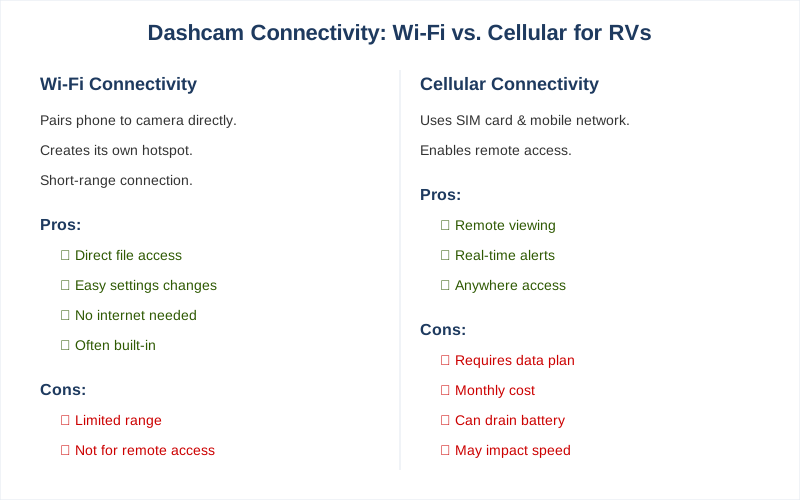
The real move with dashcam connectivity boils down to two main types: Wi-Fi and cellular. Your dashcam doesn't need internet to record; that's its primary job. The Wi-Fi feature is about wirelessly connecting your smartphone to the dashcam. It creates its own hotspot, letting you download footage or change settings directly from your phone. No internet connection needed for this. It's like having a direct line to your camera's memory card.
This connection is usually short-range, within your vehicle. Cellular, on the other hand, uses a SIM card and a mobile network. This allows for remote access, meaning you could potentially view footage or get alerts from anywhere. This usually comes with subscription fees, similar to your cell phone plan. My first dashcam was Wi-Fi only, and I learned quickly that 'wireless access' meant 'within 10 feet of the car.' Brilliant engineering.
Cellular adds another layer, but it's not essential for most users. Premium dash cams use Wi-Fi to connect on demand. It's a convenient way to check your recordings without fiddling with SD cards. The honest version: for most people, Wi-Fi is enough to get videos off the camera and change settings. Cellular is for when you absolutely need to check in from 500 miles away, which, let's be honest, is rare for a dashcam.
I once forgot to download footage after a minor fender bender, and had to drive back to the car just to get the video. A cellular connection would have saved me a 2-hour round trip. Wi-Fi is the more common feature for direct phone connection.
Why This Matters for Your Setup
Here's why this connectivity stuff actually matters for your rig:
Accessing Footage: The biggest win is getting video off the camera without pulling the SD card. Getting an SD card out with greasy hands after a roadside lunch can eat 20 minutes. The Wi-Fi app let me download the clip of some clown cutting me off right to my phone in about 2 minutes.
This is crucial for quick evidence access.
Settings Adjustments: Tweaking camera settings can be a pain on tiny screens. Being able to use your phone app is way easier. I once accidentally set my dashcam to record in super low resolution because I was trying to adjust it while driving. Rookie mistake. The app lets you change things like recording quality or parking mode settings without any hassle.
It works like a remote control.
Remote Monitoring (Cellular): If you opt for cellular, you're talking about a whole different ballgame. This is for when you're miles away and want to know what's happening around your RV. Think about leaving your rig at a campground and wanting to check in. This usually involves a monthly fee. That peace of mind is worth it when you're deep in the woods and can't see your rig.
Making the Right Choice
Choosing between Wi-Fi and cellular for your dashcam connectivity comes down to what you actually need. Don't get caught up in the hype; think about your real-world use.
Wi-Fi is Standard Convenience: For most people, Wi-Fi is perfectly adequate. It lets you grab footage and tweak settings easily when you're near the vehicle. It eliminates the need to remove the memory card. My first dashcam only had Wi-Fi, and I never felt like I was missing out for daily use.
Cellular is for Remote Access: If you plan to monitor your vehicle when you're not physically present, cellular is the way to go.
Just be prepared for the ongoing costs. It often requires a separate subscription.
Don't Overbuy: The honest version is that most dashcams will record perfectly fine without any fancy connectivity. The $50 version without Wi-Fi will still catch that hit-and-run. It records the road without internet. So, figure out if the convenience of Wi-Fi or the remote power of cellular is actually worth the extra cash and complexity for your specific situation.