First, the Basics
Understanding dash cam features for your Volkswagen Tiguan is less about fancy tech jargon and more about what actually keeps you covered when the unexpected happens. My first dash cam was a $50 Amazon special that recorded in grainy potato vision, and I learned quickly that not all dash cams are created equal.
For a car like the Tiguan, which often sees daily use and can be a target for curious hands or accidental bumps in parking lots, having the right features is game-time. It's about peace of mind, not just another blinking light on your dash. 2025 Tiguan Controls Explained shows how integrated things are getting, so your dash cam needs to play nice. Dash Cam Installation on these cars is common, and understanding the tech behind it is key.
The Core Answer
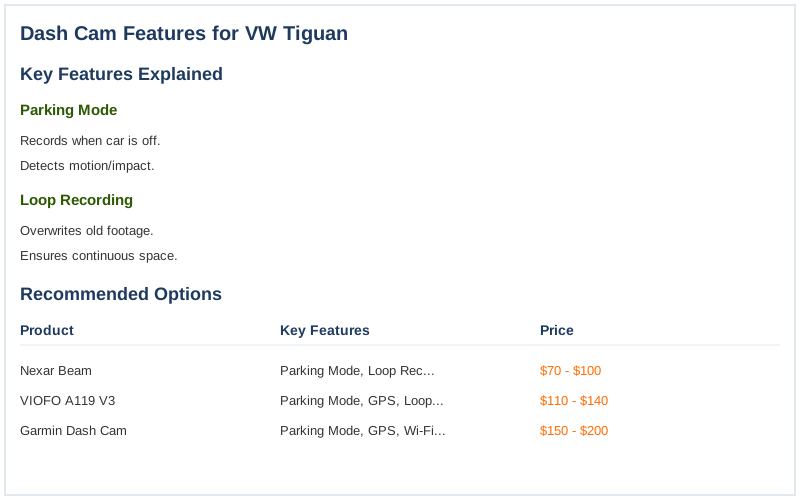
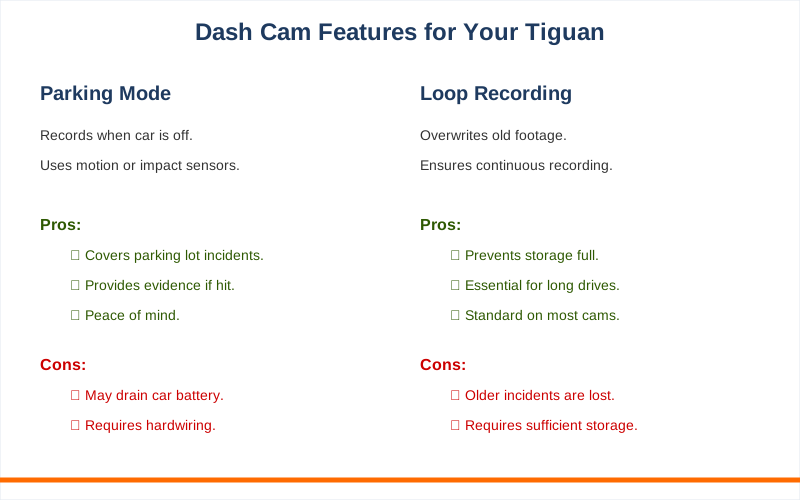
The core answer to what dash cam features matter for your Tiguan boils down to a few key things that actually make a difference when you're not in the driver's seat. First up is parking mode. This isn't just a fancy name; it's the feature that keeps your dash cam recording even when the car is off.
I learned this the hard way when someone dinged my bumper in a parking lot and I had zero footage because my old cam just shut off with the ignition. Brilliant engineering, right? Parking mode typically uses a motion detection or an impact sensor to wake the camera up and start recording when it detects something happening around your car.
Then there's loop recording. This is standard on almost everything now, but it's crucial.
It means the dash cam constantly overwrites the oldest footage to make space for new recordings. You don't want to run out of storage space right when something important happens. Think of it like a car's odometer - it just keeps going and going. Mangoal Dashcam Review shows how this works in practice.
Resolution is another big one. Don't skimp here. A 720p camera might as well be a flip phone camera from 2005.
You need at least 1080p, and ideally something higher like 1440p or even 4K, especially for the front camera. Why? So you can actually read license plates and see details in the footage. I once tried to use a blurry 720p video to report a hit-and-run. It was useless. The real move is to get something clear enough to be evidence, not just a vague moving picture.
Driver Assist Features on the Tiguan use cameras and sensors, and your dash cam needs to capture similar detail.
Field of view (FOV) is also important. A wider FOV captures more of what's happening around your car. Aim for something around 140-170 degrees for the front camera. Too narrow and you miss side impacts; too wide and the image can get distorted. It's a balancing act, like trying to pack for a weekend trip without bringing your entire house.
VW Driver Assist Systems use multiple sensors to cover more ground, and your dash cam should aim for that.
Finally, think about the connection. Hardwiring is the cleaner, more reliable option for parking mode. Just plugging into a cigarette lighter port means the camera turns off with the car, defeating the purpose of parking surveillance.
My first attempt at hardwiring was a rookie mistake involving a blown fuse and a lot of cursing, but the $50 fuse tap kit from Amazon made it way easier the second time around. Area View Camera System uses multiple cameras, so a clean install is key.
Why This Matters for Your Setup
Why does all this tech-speak matter for your Tiguan? Because your car has smart features, and your dash cam should too.
- Parking Mode: This is crucial for Tiguan owners who park on busy streets or in lots where dings and bumps are common. I once spent 3 hours arguing with a valet who insisted he didn't scratch my door. If only I'd had parking mode running that night!
- High Resolution (1080p+): Your Tiguan is a nice vehicle.
You want footage clear enough to identify a license plate if someone cuts you off or causes an accident. Trying to read a plate from a blurry video is like trying to read a menu in a pitch-black restaurant.
- Wide Field of View: The Tiguan has excellent visibility features like Area View, which gives you a 360-degree perspective.
A dash cam with a good FOV complements this by capturing a broad sweep of the road ahead.
- Reliable Power: Hardwiring your dash cam ensures it stays on when your car is off. This is way better than just plugging it into the 12V socket, which cuts power when you turn the engine off.
My first setup was a mess of wires because I didn't hardwire it.
- Impact Detection: If your car is parked and experiences a jolt, the dash cam needs to notice. This feature is essential for capturing evidence of vandalism or accidents that happen when you aren't around to witness them.
Making the Right Choice
Making the right dash cam choice for your Tiguan isn't rocket science, but it does require thinking beyond just price.
- Don't Chase the Cheapest Option: My first dash cam cost $50 and was practically useless. The honest version: you'll likely spend $100-$200 for something that actually provides reliable footage and features.
- Prioritize Parking Mode: If you park anywhere public, this feature is non-negotiable.
It's the difference between having evidence and having a he-said-she-said situation.
- Resolution is King: Blurry footage is just a waste of space. Aim for at least 1080p, and check reviews to see actual sample footage.
- Consider Installation: While some plug-and-play options exist, hardwiring offers superior reliability for features like parking mode. If you're not comfortable with car electrics, factor in the cost of professional installation - maybe $100-$150 depending on your area.
- Think About Storage: Most cams need a good quality microSD card.
Don't grab the cheapest one; get one rated for continuous recording. VW Tutorials can help you understand your car's systems.