The Big Picture
So, you bought a used car. Great. Now you're staring at a spaghetti bowl of unknown wiring and wondering if adding a dashcam will turn your daily driver into a smoking pile of copper. I've seen that exact scenario play out on a 2013 F-150 where an owner tried to hardwire a cheap camera into a corroded accessory circuit, costing him $450 in diagnostics and a new fuse box. Don't be that guy.
This buyer's guide isn't about fancy features; it's about not melting your new-to-you ride.
Your used car's electrical history is a black box. Flood damage? Accident with hidden wiring repairs? Who knows. The existing wiring harness could be brittle, the insulation could be cracked, or some previous owner might have spiced into a critical circuit with a crimp connector that has 500 milliohms of resistance. That's a voltage drop waiting to happen, or worse, a thermal event.
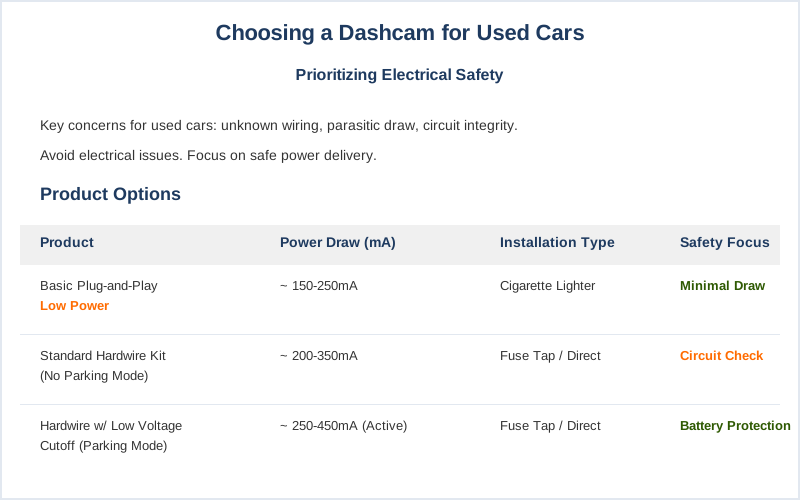
My primary concern for a used car with unknown electricals is always parasitic draw and circuit integrity. A dashcam, especially one with parking mode, pulls current even when the car is off. On a healthy 12V system, a well-installed camera drawing 200mA might take a week to kill a 60Ah battery.
But if your used car already has a baseline parasitic draw of 150mA from, say, a flaky alarm module, that 200mA camera just cut your battery life to three days. You'll be jump-starting it every Tuesday. Reddit threads are full of stories about dead batteries after dashcam installs on older vehicles.
Before you even think about video resolution, you need to think about power delivery. We're talking about maintaining stable voltage and current, preventing thermal runaway in undersized wires, and ensuring your camera's power supply doesn't introduce noise into other vehicle systems. This isn't just about recording accidents; it's about not creating one with a faulty electrical mod.
So, we'll focus on cameras that minimize electrical risk and installation methods that protect your vehicle's existing circuits. Forget the 'experience' of crystal-clear footage for a second. Let's make sure your car still starts in the morning. That's the real premium feature.
Key Features to Consider
Key Features to Prioritize
When you're dealing with a used car, 'features' translate directly to 'potential failure points' or 'current draw.' My priority list starts with mitigating risk, not capturing cinematic sunsets. Car and Driver's gear team runs rigorous tests, but they aren't looking at your existing 15-year-old wiring harness.
Here's what matters when your car's electrical history is a mystery:
| Feature | Why It Matters for Used Cars |
|---|---|
| Capacitor-Based Power | Batteries (Li-ion) inside dashcams degrade with thermal cycling, especially in hot climates. A swollen Li-ion battery can expand, damaging the camera or, worst case, present a thermal runaway risk. Capacitors tolerate a wider thermal range (e.g., -4F to 158F) and have a much longer cycle life. Less outgassing, less fire risk. |
| Low Power Consumption (Parking Mode) | Every milliamp counts. If you want parking mode, ensure the camera has an efficient low-power sleep mode or a hardwire kit with voltage cutoff. A 200mA draw on a 60Ah battery is bad; a 200mA draw on a 40Ah battery with a 100mA parasitic leak is a dead battery in 24 hours. Know your limits. |
| Simple 12V Power Connection | Avoid anything that requires splicing into complex CAN bus systems or multiple power sources. A simple cigarette lighter plug (if your socket is robust) or a basic 2-wire hardwire kit (ACC + BATT) minimizes points of failure and makes troubleshooting easier. Some used cars come with mysterious existing wiring - keep it simple. |
| High-Quality SD Card Support | A cheap SD card can corrupt footage, leading to lost evidence. More critically, constant read/write cycles on a low-end card generate heat. That thermal stress can lead to premature failure and data loss. Use an industrial-grade high endurance card, rated for dashcam use. |
| G-Sensor Sensitivity Adjustment | If your used car has worn suspension bushings, it might transmit more road vibration. An overly sensitive G-sensor will trigger parking mode recordings constantly, filling your SD card and increasing power draw. Adjust the sensitivity down to avoid false positives and wasted power. |
Don't get dazzled by 4K resolution if your power delivery system is going to crap out. A clear 1080p recording from a reliable camera is better than a 4K black screen. Focus on the core engineering: stable power, reliable storage, and thermal resilience.
Our Top Picks
Budget vs Premium Options
Cutting Corners or Building Robust?
When it comes to dashcams, the budget vs. premium debate usually boils down to component quality and manufacturing tolerances. On a used car, this isn't just about video fidelity; it's about the thermal cycling resilience of the power supply and the mechanical integrity of the mounting. DashcamTalk forum discussions often highlight the importance of heat-resistant supercapacitors in premium models.
| Feature | Budget Options (~$50-120) | Premium Options (~$150-400+) |
|---|---|---|
| Power Source | Often Li-ion batteries. These degrade quickly with thermal cycling (e.g., car interior hitting 140 degrees F). Swelling is a common failure mode, leading to case distortion or internal circuit damage. | Supercapacitors. More expensive, but tolerate extreme temperatures (-4F to 158F) with minimal degradation over tens of thousands of cycles. Superior long-term reliability. |
| Video Quality | 1080p, sometimes interpolated 2K. Sensor sensitivity is lower, leading to grainy night footage where license plates are illegible. Lower bitrate means more compression artifacts. | True 2K or 4K, often with Sony STARVIS 2 sensors and HDR. Better low-light performance, less noise, and higher bitrates for clearer details. Crucial for evidence. |
| Parking Mode | Basic motion detection, often with higher power draw or requiring constant power. May not have robust voltage cutoff, risking battery drain. | Buffered parking mode (records before/after event), low-power modes, robust hardwire kits with adjustable voltage cutoffs (e.g., 11.8V to 12.4V). Better protection for your car's battery. |
| Mounting Hardware | Suction cups or adhesive that loses adhesion after a few thermal cycles. Vibration can cause image blur and eventually mechanical fatigue in the mount. | Stronger 3M VHB adhesive mounts, or integrated trim replacements (like the FitcamX). Better vibration dampening, less chance of the camera falling off and getting damaged. |
| SD Card Reliability | Bundled generic SD cards with low write endurance. High failure rate under constant dashcam recording, leading to corrupted data. | No SD card included, or a high-endurance card. Designed for constant read/write cycles, reducing data loss due to cell degradation. |
Frankly, on a used car, a premium camera with supercapacitors is cheap insurance against electrical headaches. Saving $50 on a camera could cost you $200 in battery replacements or diagnostics. Congratulations, you played yourself.
Setup and Installation Tips
Hooking It Up Without Blowing a Fuse
Installing a dashcam, especially in a used car with unknown electricals, isn't just sticking it to the windshield. It's about preserving circuit integrity and preventing parasitic draw. I've seen too many DIY installs that look like a rat's nest, leading to intermittent power, voltage drops, and even melted insulation. This video guide covers the basics, but I'll add the 'dirtbag engineer' caveats.
- Inspect Your Power Source.
- Action: If using the cigarette lighter, check the socket for corrosion, excessive play, or signs of previous arcing. Grab a multimeter and check voltage with the car off and on. It should be a stable 12.0-12.8V off, 13.8-14.4V on. A fluctuating reading means trouble.
- Why: A loose socket means intermittent contact, causing arcing and thermal stress on the fuse. A weak 12V rail suggests underlying electrical issues that a dashcam will only exacerbate.
- Choose Your Power Tap Wisely.
- Action: For parking mode, you need a hardwire kit. Identify a switched fuse (ACC) that's only live when the car is on, and an always-on fuse (BATT) for parking mode. Use a fuse tap (add-a-fuse) with the correct fuse rating. Never tap into critical safety circuits like airbags or ABS.
- Why: Tapping into the wrong circuit can introduce noise, interfere with vehicle modules, or blow fuses for essential systems.
An add-a-fuse ensures mechanical integrity and proper fuse protection for both the original circuit and the dashcam. Many guides show how to use these.
- Manage Your Cables.
- Action: Route cables along existing wiring harnesses, securing them with zip ties every 6-8 inches. Avoid pinching cables in door jams or under sharp trim pieces. Leave enough slack at connection points to prevent strain during vibration.
- Why: Pinched cables can abrade insulation, leading to shorts. Excessive tension creates stress concentrations, potentially pulling connectors loose or causing wire fatigue fractures over time. Vibration is your enemy.
- Test for Parasitic Draw.
- Action: After installation, with the car off and locked, use a multimeter in series with the battery's negative terminal to measure total current draw. Wait 15-30 minutes for modules to sleep. Note the reading.
- Why: Your dashcam's parking mode will draw current. If the total draw exceeds, say, 50-70mA (plus your camera's spec), you've got a problem. A 300mA draw will kill a healthy battery in days, let alone one already compromised.
This is non-negotiable for a used car.
Care and Maintenance Tips
Keeping Your Footage and Your Car Alive
Dashcams aren't set-and-forget devices, especially in a used car. Neglecting maintenance means risking lost footage, premature camera failure, or worse, stressing your vehicle's electrical system. It's about managing thermal load and data integrity. Consumer Reports stresses checking your card regularly.
- Regular SD Card Checks.
- Action: Format your SD card every 1-2 months. If your camera has a 'format reminder,' use it. Replace the SD card every 1-2 years, regardless of apparent function.
- Why: SD cards have a finite number of write cycles. Constant overwriting degrades the NAND flash cells, increasing the failure-rate and risk of data corruption. Formatting refreshes the file system, reducing fragmentation and improving write performance. Thermal cycling also accelerates this degradation.
- Inspect Power Connections.
- Action: Every 3-6 months, visually inspect the cigarette lighter plug or hardwire connections. Look for discolored wires (indicating heat), loose connections, or corrosion. Gently tug on the connectors to check for mechanical play.
- Why: Vibration and thermal cycling can loosen connections over time. A loose connection increases resistance, generating heat (I squared R losses) and causing voltage drops. This thermal stress can melt insulation or lead to intermittent power to the camera.
- Clean Lens and Housing.
- Action: Use a microfiber cloth and a gentle lens cleaner (or just water) to clean the camera lens weekly. Wipe down the camera body to remove dust buildup.
- Why: Dust and grime on the lens degrade image quality, making license plates unreadable. Dust inside the housing can act as an insulator, trapping heat and increasing the internal operating temperature, which shortens component lifespan.
- Monitor Battery Voltage (if parking mode is active).
- Action: If your hardwire kit doesn't have a voltage display, periodically check your car's battery voltage with a multimeter after the car has been off for several hours. Compare it to baseline.
- Why: A consistent drop in voltage (e.g., from 12.6V to 12.0V overnight) indicates excessive parasitic draw.
This means your parking mode cutoff might be too low, or you have an underlying electrical issue that the dashcam is exacerbating, leading to premature battery death. Don't let your camera kill your starting power.
Final Recommendations
The Bottom Line for Your Beat-Up Ride
Look, a dashcam isn't just another gadget; it's a critical piece of evidence-gathering hardware. But in a used car, it's also a potential electrical liability. My final recommendation always leans towards reliability and minimal stress on your vehicle's electrical system, not just the highest resolution. Prioritize system integrity above all else. Pickup Truck Talk also emphasizes solid installation, and they're not wrong.
- Capacitors, not Batteries: This is non-negotiable for longevity and thermal safety. Li-ion batteries in dashcams are a ticking thermal bomb in hot climates. Capacitors shrug off temperature swings.
- Hardwire with Voltage Cutoff: If you want parking mode, get a quality hardwire kit with adjustable low-voltage protection. Set it to 12.0V or higher if you're paranoid about starting issues.
This prevents your dashcam from draining your battery to the point of no return.
- Quality SD Card: Spend the extra $20-30 on a high-endurance microSD card. It's the cheapest insurance against corrupted footage and data loss. A cheap card is a single point of failure.
- Inspect and Test: Don't just install and forget. Periodically check connections, monitor parasitic draw, and format your SD card.
Your used car's electrical system has enough unknowns already; don't add more by being lazy.
- Simplicity Wins: Avoid multi-channel, cloud-connected, feature-laden monstrosities if your car's wiring is questionable. A solid front-facing camera with reliable power is 90% of what you need without 100% of the headaches.
Your used car might have electrical gremlins you don't even know about. Don't give them another reason to act up. Keep it simple, keep it robust, and keep it working.