
Start Here: The AC Section Has Its Own Power Button
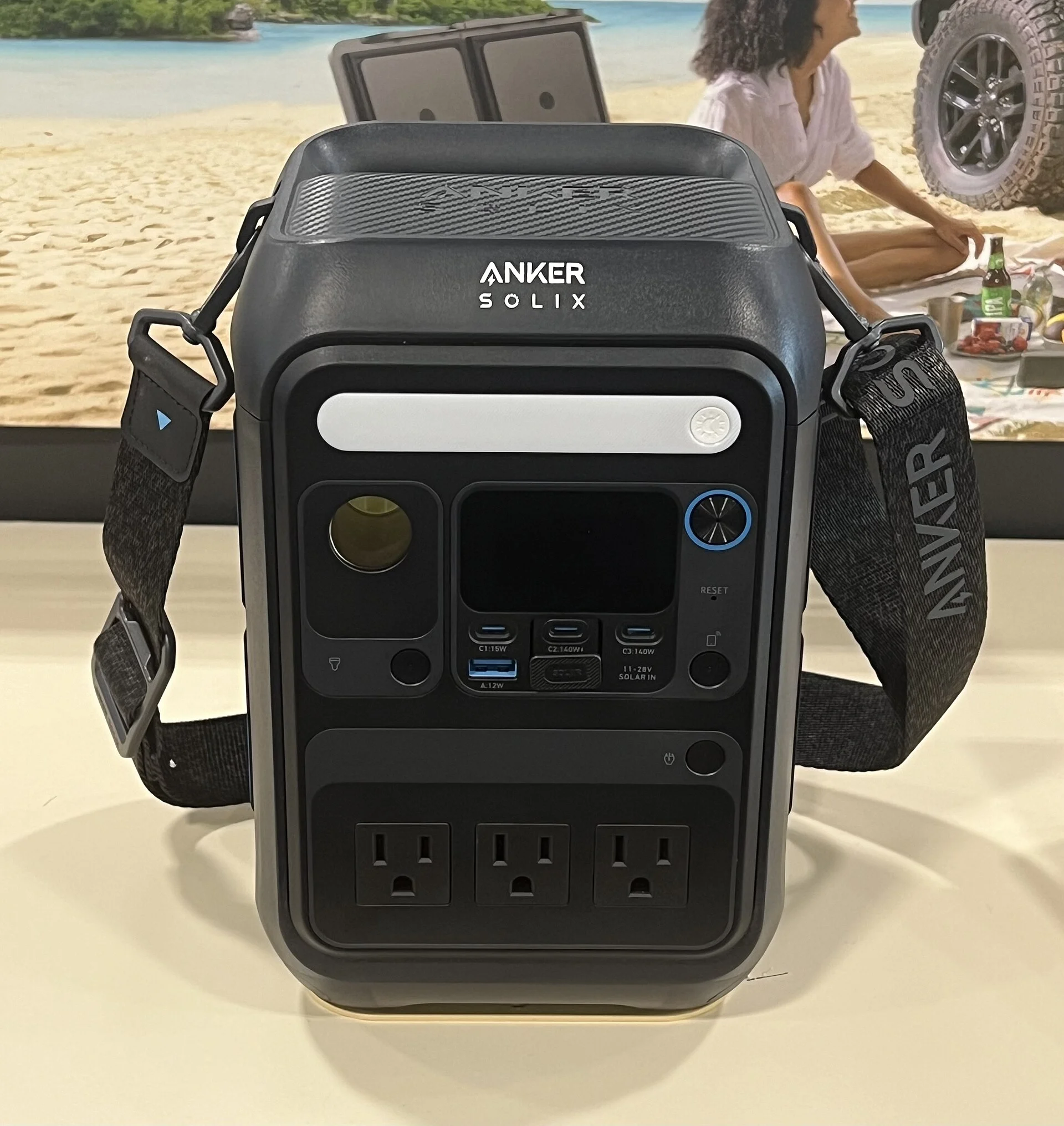
The single most common reason a power station's wall outlet is dead while the USB and 12V ports still work is the simplest one: the AC inverter section has its own power button, and it is off. On most portable power stations the AC side is powered independently of the rest of the unit, because running the inverter all the time would waste energy converting DC to AC that nothing is using. So the main display can be lit, your phone can be charging off USB, and the wall sockets can still be completely dead - by design.
Look for a button near the AC outlets, usually labeled AC or marked with a sine-wave symbol. Press it and watch for a confirmation: an indicator light next to the outlets, an AC icon on the screen, and often the cooling fan spinning up as the inverter comes online. On Jackery units the AC button is held for one to two seconds until the indicator turns solid green and the fan starts, rather than tapped. If nothing lights up on the first quick press, hold it.
This is worth ruling out before anything else because it explains the exact symptom people find alarming - one class of ports working and another dead. A truly failed unit tends to be dead everywhere or throw an error on the screen. A live display with a silent AC section is the signature of an inverter that simply has not been switched on, and it is a one-button fix that costs nothing.
The Energy-Saving Trap: A Load Too Small to Stay Awake
If the AC button lights up but a small device still gets no power, the culprit is often an energy-saving mode that decides your load is too trivial to keep the inverter running. Jackery power stations, for example, enter an auto shut-off mode where if the device drawing from the AC output is 25W or less, all outputs switch off after 12 hours. The idle-shutoff generally trips when less than about 10W is being drawn, so very low-power gadgets - a phone brick, a string of LEDs, a trickle charger - can fail to keep the AC output awake at all.
This produces a maddening symptom: a laptop charger works fine, but a tiny USB wall adapter plugged into the same AC outlet appears dead. The inverter is not broken. It is looking at a sub-10W draw, deciding nothing meaningful is connected, and going back to sleep to save the battery. The bigger the appliance, the less likely you ever see this; the smaller the gadget, the more likely it triggers.
The fix is to turn energy-saving mode off. On Jackery units the auto shut-off is disabled by simultaneously long-pressing the AC button and the main power (display) button until the energy-saving indicator disappears. Other brands bury the same setting in a companion app. Once it is off, the AC output stays live regardless of how little the connected device draws, and the tiny-charger-won't-work complaint disappears.
Overload: When the Load Trips the Inverter Off
At the opposite extreme, the AC output can shut down because the load is too big, not too small. Portable power stations cut the AC output the instant total load exceeds the inverter's rated wattage, and the unit only resumes once the overload is removed - and, on some models, the AC is manually re-enabled. This is protection working correctly, but from the outside it looks like the outlet died the moment you plugged something in.
The math is worth respecting. A mid-size unit like the EcoFlow Delta 2 is rated at 1800W continuous, with a 2700W surge headroom for the brief inrush when a motor or compressor starts. A heat-producing appliance - a kettle, a hair dryer, a space heater - can blow straight past a station's continuous rating on its own. Stack two of them and even a large unit trips. When the outlet goes dead the instant a high-wattage device switches on, suspect overload before anything electrical.
Some stations offer a workaround for stubborn resistive loads. EcoFlow's X-Boost, for instance, lets the Delta 2 run appliances up to about 2200W beyond its 1800W rating by lowering the output voltage, so it only works with simple resistive or compatible loads and not with sensitive electronics. Add up the wattage of everything on the AC outlets, keep the total under the rated figure, and start big appliances one at a time so their surge does not coincide.
The Hidden Reset Button After an Overload
Here is the detail that leaves people convinced their AC output is permanently dead after a single overload: many units do not simply re-arm themselves. On Jackery stations, once the AC output has tripped on overload, a small reset button pops up in the AC-output area, and it must be pressed firmly until it clicks back before AC power returns. Until you push it, the outlets stay dead no matter how many times you toggle the main AC button.
It is easy to miss because it is a mechanical breaker, not a menu item, and it sits flush with the panel until it trips. Owners who unplug the offending appliance, cycle the power, and still get nothing often conclude the inverter failed - when the real story is a popped breaker waiting for a firm press. Look closely at the plastic around the AC sockets for a button standing slightly proud of the surface.
The sequence matters. Remove the overloading appliance first, then press the reset until it clicks, then re-enable the AC output. Resetting with the heavy load still plugged in just trips it again immediately. Once the breaker is back in and the load is sensible, the outlets come back to life, which confirms the whole episode was overload protection rather than a hardware fault.
Idle Timeout: It Shut Everything Down While You Weren't Looking
Sometimes the AC output is dead because the entire unit timed out and switched itself off hours earlier. Idle-shutoff timers are separate from the low-load energy-saving behavior and are meant to stop the station sitting on standby draining itself. Bluetti units, for example, default to shutting off after about 4 hours with no output or charging activity, and that idle timer can typically be extended or disabled in the companion app.
This bites when a device draws power only intermittently. A fridge that cycles, or a camera that sleeps between recordings, can leave long gaps of near-zero draw. The station reads those gaps as inactivity, counts down its idle timer, and powers off - so you return to find not just the AC outlet but everything dead, and no obvious reason why. The unit did exactly what its timeout told it to.
The fix is again a setting rather than a repair. Extend or disable the idle timeout for any run where you expect long low-draw stretches, and confirm the unit is fully on before assuming the outlet failed. If pressing the main power button brings the whole station back and the AC then works normally, an idle timeout - not the inverter - was the cause of the dead outlet.
Is It the Outlet, the Cord, or the Appliance?
Before condemning the power station, prove which link in the chain is actually dead. The station, the plug, the cord, and the appliance are four separate suspects, and it is easy to blame the box when the fault is downstream. The cleanest test is to swap in a device you know works - a lamp, a phone charger with a visible indicator - directly into the station's AC outlet.
If the known-good device lights up, the station's AC output is fine and your original appliance or its cord is the problem. If the known-good device is also dead, move it to a second AC outlet on the same station, because a single failed socket is far less common than a whole inverter section being off, but it does happen. A cheap plug-in wattage meter makes this instant - it shows whether the outlet is live and exactly how many watts the appliance pulls, which also tells you if you are near an overload threshold.
Work outward from the station. Confirm the outlet is live with a known-good load, then test the suspect cord, then the appliance itself on a wall socket at home. Most dead-outlet complaints resolve at this stage into a frayed cord or a genuinely failed appliance, and you avoid chasing a fault inside a station that was working the whole time.
A Temperature Lockout Can Cut the AC Output
Heat is an under-appreciated reason the AC output goes dead. A power station's battery-management system watches internal temperature, and when it climbs past the safe ceiling the BMS triggers an automatic thermal-protection shutdown. Most units are designed for an operating range of 0-40C (32-104F), and pushing an inverter hard in hot conditions is exactly the situation that drives internal temperature over that limit.
The scenario is common in a parked vehicle. A hot car cabin can far exceed the 40-45C charge and operate ceilings on its own, and adding a heavy AC load piles inverter waste heat on top of an already hot box. The station protects itself by dropping the high-draw AC output first, which is why the wall outlet can go dead while the low-power USB ports keep working. It is self-preservation, not failure.
These thermal shutdowns are usually reversible once the unit cools, resuming automatically or after a manual restart. Move the station out of direct sun and hot cabins, give its intake and exhaust vents clear space, and let it come back to temperature before reconnecting a big load. If the AC returns once the box is cool, heat was the trigger - and the lasting fix is ventilation and shade, not service.
Firmware and the App: The Fix That Isn't Physical
Not every dead-outlet problem is on the panel. On app-connected stations, some AC-output faults are logic bugs rather than hardware, and the fix lives in a firmware update. There is precedent: an early EcoFlow River Max firmware bug was resolved by a 2021 update, and dust-clogged vents have separately caused units to misbehave. Checking the companion app for a pending update is a five-minute step that occasionally solves an otherwise baffling outlet fault.
The app is also where several of the settings above live. Idle timeouts, charge behavior, and on some brands the AC energy-saving threshold are all controlled there rather than on the unit. If the physical buttons are not restoring the outlet, connect the app, read the current output status, and look for a setting that is silently keeping the AC off - a storage mode, a schedule, or an output disabled remotely.
While you are in the app, note any error or protection state it reports. A station that shows an active over-temperature or overload flag is telling you exactly why the outlet is dead, turning guesswork into a specific fix. Update the firmware, clear the vents, and read the reported status before you decide the inverter itself has failed.
When It's Actually a Failed Inverter Board
Only after the settings, breaker, load, heat, and firmware are all ruled out is it fair to suspect the inverter hardware. A genuinely failed inverter board has a different signature: the AC button lights up, no protection state is reported, the unit is cool, the load is trivial and known-good, and yet the outlets stay dead. When every logical explanation is exhausted and the AC still will not come alive, the DC-to-AC stage may have failed.
This is rare relative to the settings-and-protection causes above, which is precisely why it belongs last. An inverter board is not a user-serviceable part - it involves high-voltage AC circuitry and a sealed enclosure - so the correct move is warranty service or manufacturer support rather than opening the case. Note that USB and 12V ports run off a separate stage, so those working tells you the battery and BMS are fine and narrows the fault to the AC section specifically.
Arriving here last saves most people a needless return. The whole point of the sequence is that the cheap, instant fixes - a button, a mode, a breaker, some airflow - sit at the top, and the one real hardware failure sits at the very bottom. If you have honestly worked the chain and the AC output is still dead cold, document what you tried and let the manufacturer take it from there.
The Verdict: Work the AC Chain, Button to Board
A power station with live USB and 12V ports but a dead wall outlet is almost always a rule being followed, not a part that broke. Press the AC section's own power button and hold it if needed. Turn off energy-saving mode so a sub-10W gadget can keep the inverter awake. Add up your load against the rated wattage, remove any overload, and press the popped-up reset button until it clicks. Check whether an idle timeout shut the whole unit down.
Then prove the fault is really the station by testing a known-good device, rule out a heat lockout by cooling and ventilating the box, and check the app for a firmware update or a reported protection state. Only when all of that is clean does a failed inverter board become the honest conclusion, and by then you have almost certainly already found the real cause higher up the list.
The AC output is a chain of conditions - switched on, awake, within load, un-tripped, cool, and current on firmware - and a dead outlet just means one condition is not met. Diagnose in that order and you will restore most dead outlets in minutes without tools, and you will know with certainty on the rare occasion a unit genuinely needs service.