
Understanding Dash Cam Resolution: What's Best for Your VW Camper Van?
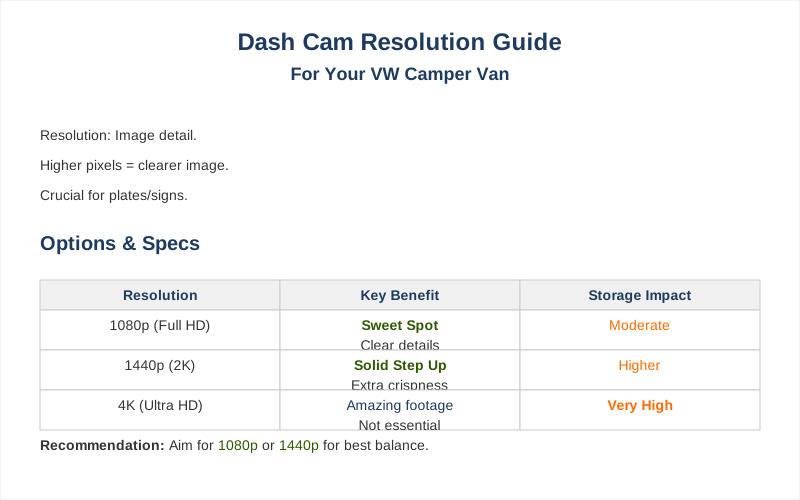
The resolution on your dash cam is basically the number of tiny dots that make up the picture. More dots mean a clearer image, which is super important when you need to actually see a license plate or a street sign in a pinch.
The resolution on your dash cam is basically the number of tiny dots that make up the picture. More dots mean a clearer image, which is super important when you need to actually see a license plate or a street sign in a pinch. It's measured in pixels, and the common ones you'll see are 720p, 1080p, and then the fancy stuff like 2K and 4K. Understanding these numbers is key before you even start looking.
If you're just starting out, maybe 720p seems okay, but trust me, you'll regret it when you can't make out the make of the car that cut you off. I learned that lesson the hard way on a trip through the Rockies.
The Core Answer
For your VW camper van, you absolutely want to aim for at least 1080p resolution. Anything less is basically a blurry mess that won't help you when it matters most. I remember trying to use a 720p camera on my first road trip, and trying to read a license plate was like trying to read a newspaper from across the street in a dust storm. 1080p (Full HD) is the sweet spot for most people because it gives you good detail without completely eating up your storage space. It's enough to clearly see license plates and read road signs, which is the whole point, right? You don't need to go crazy with 4K unless you're planning on filming your own action movie. My buddy tried a 4K cam in his Sprinter, and while the footage looked amazing, his memory card filled up in like 3 hours. The real move is 1080p, or if you want a bit more crispness, 1440p is a solid step up without the massive storage hog of 4K. I've seen forum posts where people swear by 1440p for the extra detail it provides, especially in tricky lighting. 1440p is often recommended as an optimal setting. Think of it this way: 720p is like looking through a dirty windshield, 1080p is like a clean one, and 1440p is like having a squeegee on standby. Higher resolutions are great for capturing finer details, like identifying vehicles in low-light conditions or spotting small road signs that might be missed at lower resolutions. Higher resolutions capture more detail. When I was driving through Yellowstone last fall, the fog rolled in unexpectedly. My 1080p camera was just barely good enough to make out the car in front of me, but a 720p camera would have been useless. The goal is to have footage that's clear enough to be useful evidence, not just pretty pictures. You're not trying to win an Emmy for cinematography; you're trying to prove you weren't the one who ran that red light. The honest version is that 1080p is the most practical for everyday use and most incidents. It balances clarity with manageable file sizes. It's the $50 version that actually works.
Why This Matters for Your Setup
Why does this even matter for your camper van? Because you're not just driving to work; you're often on longer trips, covering more ground, and sometimes in less-than-ideal conditions. My first trip where I actually needed the dash cam footage was on a rainy day in Oregon. The car in front of me slammed on their brakes, and I barely avoided hitting them. Without clear footage showing their sudden stop, it would have been my word against theirs. Here's the breakdown:- Reading License Plates: This is the big one. If you're in an accident or witness something, being able to clearly read the license plate of another vehicle is crucial. Lower resolutions simply can't do this reliably.
- Seeing Details in Low Light: Camper vans often get used for early morning starts or late-night arrivals. A higher resolution camera will give you a much better chance of seeing what's happening on the road when it's dark. I've had a few scary encounters with deer at dusk that a better camera would have captured more clearly.
- Capturing the Whole Scene: A wider field of view combined with good resolution means you get more context. This helps in understanding the full picture of an event, not just a zoomed-in, blurry mess.
- Storage Space: This is the trade-off. Higher resolutions mean bigger video files. For a camper van, you might be on the road for days. You need to balance the need for clarity with how much storage you have. 1080p is usually a good compromise.
Making the Right Choice
So, what's the final word on dash cam resolution for your camper van? Don't overthink it, but don't cheap out either. The goal is functional evidence, not Hollywood cinematography. Think of it like packing for a camping trip: you need the essentials, and then you can add the niceties. Here's the quick version:- Minimum is 1080p: Seriously, anything less and you're wasting your money. I saw a guy on a forum trying to use a 720p camera to identify a hit-and-run driver. He was SOL.
- 1440p is the sweet spot: If your budget allows, stepping up to 1440p gives you noticeably better detail without the massive storage drain of 4K.
- 4K is overkill (usually): Unless you're specifically worried about capturing incredibly fine details at extreme distances, 4K is probably more than you need and will fill up your memory cards way too fast.
- Consider your storage: Make sure your dash cam supports a large enough memory card for the resolution you choose. A 1080p camera with a tiny card is useless if it only records for an hour.
Frequently Asked Questions
If I get a 1080p dash cam installed at a shop for $200, can I just buy a $50 one online and plug it in myself and get the same result?
Do I really need to worry about frame rate (FPS) if I'm just going for 1080p resolution?
What if I buy a 1080p dash cam and the footage still looks terrible in the dark?
Could a constantly running dash cam drain my camper van's battery if I don't hardwire it?
I heard 4K is always better, so I should just get that for my camper van, right?
🏅 Looking for Gear Recommendations?
Check out our tested gear guides for products that work with this setup: