
Dashcam Gps What Does It Do (2026 Complete Guide)
The dealer wanted $300 to install a basic dashcam in my buddy's 2017 F-150. He figured it was just a camera, right? What they didn't tell him, and what most 'installers' won't explain, is that a dashcam with GPS isn't just recording video.
The dealer wanted $300 to install a basic dashcam in my buddy's 2017 F-150. He figured it was just a camera, right? What they didn't tell him, and what most 'installers' won't explain, is that a dashcam with GPS isn't just recording video. It's logging telemetry data that turns blurry footage into cold, hard evidence. Nexar's guide barely scratches the surface of this critical distinction. You're buying a data logger, not just a GoPro for your windshield.
Understanding dashcam GPS what does it do
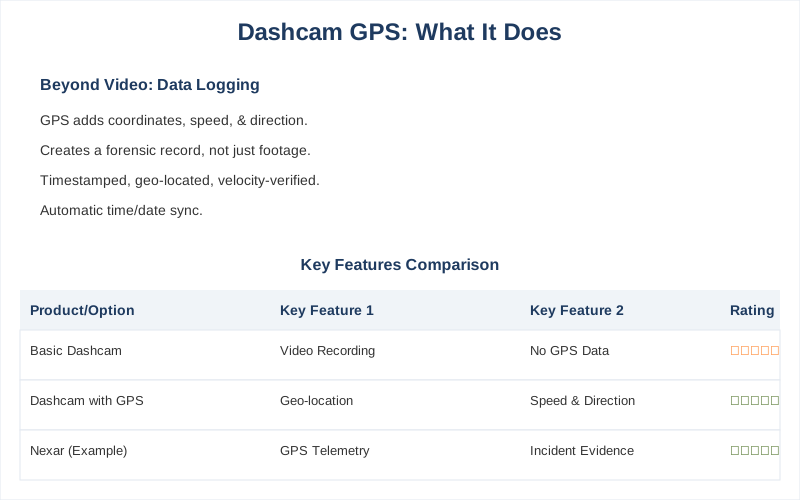
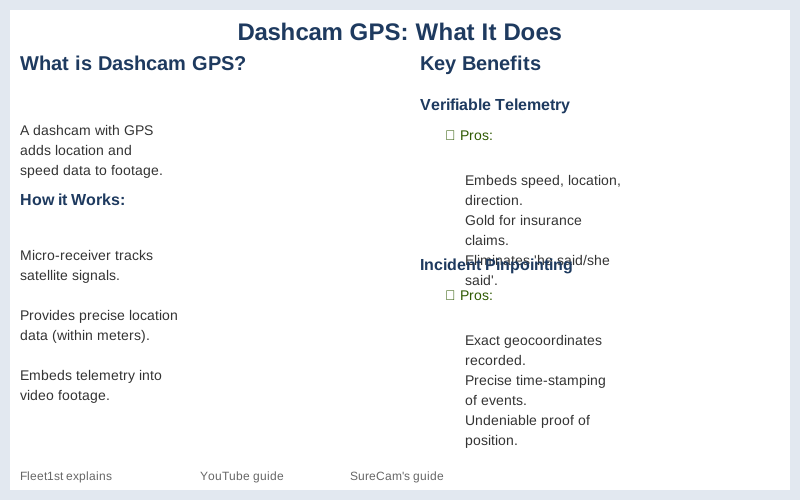
So, what does a dashcam GPS actually do? It integrates satellite positioning data directly into your video files. This isn't just a fancy feature; it's a fundamental shift in how incident data is recorded. Without it, you've got video; with it, you've got a timestamped, geo-located, and velocity-verified forensic record. Some YouTube guides might gloss over this, but the difference in evidential weight is massive.
The primary function is simple: it records your vehicle's exact coordinates, speed, and direction of travel. This data is usually embedded as a subtitle file (SRT) or overlaid directly onto the video. Think of it as a digital black box for your daily commute. The dealer just wants to sell you hardware, not explain the underlying data integrity.
This isn't just about proving you weren't speeding. It's about establishing a chain of custody for your vehicle's movement. If some yahoo claims you swerved into them, the GPS data shows your precise path. No 'he said, she said' when the data logs speak for themselves. The Wirecutter recommends models with this feature for a reason.
It also automatically sets the time and date with atomic clock precision. Ever notice how your car's clock drifts a few minutes every month? GPS syncs to within milliseconds, which is crucial for correlating events with other data sources, like traffic camera footage or witness statements. A few seconds off can ruin your alibi.
Some dashcams even use GPS to trigger parking mode events. If the camera detects a sudden change in position or acceleration while parked, it can mark that event. This helps narrow down footage review, saving you from sifting through 12 hours of parked car video. Reddit users often highlight the value of accurate timestamps and location data in accident scenarios.
dashcam GPS what does it do in Detail
So, let's break down what a dashcam's GPS module actually quantifies. It's more than just a dot on a map; it's a sensor suite providing hard numbers. This is where the engineering matters, not the marketing fluff. VIOFO highlights sensor quality, and GPS is a key part of that data capture.
- Location Stamping: Every video frame, or segment, gets precise latitude and longitude coordinates. This is logged in degrees, minutes, seconds, or decimal degrees, depending on the file format. This isn't just for showing where you were; it's for proving where you weren't. If someone claims an incident occurred on Main Street, and your GPS puts you on Elm, that's a pretty strong counter-argument.
- Speed Verification: The GPS receiver calculates your ground speed in real-time, typically in kilometers per hour or miles per hour. This data is logged alongside the video. This is huge for insurance claims. If a police report says you were doing 70 MPH in a 45 zone, but your dashcam data shows 42 MPH, that's a 28 MPH discrepancy that saves your insurance rates. This is a common dispute point, as Concox explains.
- Route History: Over time, the logged coordinates create a detailed breadcrumb trail of your vehicle's movements. This can be viewed on mapping software, showing your exact path, turns, and stops. For fleet managers, this is invaluable for verifying deliveries or optimizing routes. For personal use, it proves you weren't joyriding when you said you were at the grocery store.
- Time Synchronization: GPS signals carry extremely accurate time data from atomic clocks. Your dashcam uses this to ensure every video file, every data point, is timestamped to within milliseconds of universal coordinated time (UTC). This eliminates any debate about when an event occurred, which is critical for legal and insurance purposes. No more 'my clock was wrong' excuses.
- Impact Detection Enhancement: Many dashcams have a G-sensor to detect impacts. When combined with GPS data, this becomes far more powerful. An impact logged at 30 MPH with a sudden deceleration rate of 10G and a specific location provides irrefutable context. Without GPS, it's just a bump; with it, it's a documented collision event.
Common Questions About dashcam GPS what does it do
People always ask dumb questions about technology they don't understand. So let's clear up some common misconceptions about dashcam GPS. You're not tracking aliens; you're just getting better data. Fleet guides emphasize data integrity, and for good reason.
Does GPS drain my car battery faster?
No, not significantly. A GPS module typically draws a few milliamps - less than a tiny LED light. The dashcam itself, and especially its recording processor, will draw far more power. If your battery is dying, check for parasitic draws from other accessories, not the GPS. DashCamTalk forum discussions confirm GPS power draw is negligible.
Can GPS data be tampered with?
Technically, any digital data can be altered, but it's extremely difficult to do so undetectably with embedded GPS data. The data is usually cryptographically signed or embedded in a way that shows any modification. Plus, the raw GPS logs are often separate from the video, making it harder to fake. You'd need a dedicated forensics team to pull that off without leaving a trace.
Is GPS tracking an invasion of privacy?
If it's your car and your dashcam, no. You're tracking your own vehicle's movement. For fleet vehicles, employees are typically informed that vehicles are GPS-tracked for safety and logistics. It's about accountability, not spying, though I'm sure some drivers feel otherwise. The data is for incident reconstruction, not checking if you stopped for an extra coffee.
Do I need a separate GPS antenna?
Most modern dashcams integrate the GPS receiver directly into the main unit or the mount. Some older or cheaper models might have a small external puck antenna for better signal reception, especially if the main unit is tucked away. Check the spec sheet; if it's integrated, you're good. If it's a cheap unit, an external antenna might improve signal lock time.
Tips and Best Practices
Having a dashcam with GPS is only half the battle. You need to use it right, or that data is just taking up space on your SD card. Don't be the guy with the footage but no context. This is about making your evidence bulletproof. Fleet management guides live and die by this principle.
- Proper Mounting Location: Mount the dashcam where it has a clear view of the sky. Metal tinting, heated windshields, or being tucked behind a large rearview mirror can degrade GPS signal strength. A weak signal means fewer satellites locked, leading to less accurate position data. Aim for maximum sky visibility.
- Verify GPS Lock: Most dashcams have an indicator light or an icon on the screen that shows when GPS is locked and receiving data. Before you drive off, especially on a long trip, make sure that indicator is solid green or shows 'GPS OK'. No lock, no data. It's a simple check that takes 2 seconds.
- Regular Firmware Updates: GPS algorithms are constantly being refined. Manufacturers release firmware updates that can improve signal acquisition speed, accuracy, and overall reliability. Don't ignore those notifications. An updated system means better data. Wolfbox's tech talk emphasizes the importance of accurate data for speed verification and location stamping.
- Use the Right Software: Your dashcam manufacturer usually provides proprietary playback software that integrates the video and GPS data seamlessly. This software displays your speed, location on a map, and G-sensor data alongside the video. Trying to play the raw video file without this software is like looking at a blueprint without a legend.
- Backup Your Data: Don't rely solely on the SD card. If an incident occurs, immediately back up the relevant footage and data to a computer or cloud storage. SD cards can corrupt, especially after repeated write cycles and thermal cycling in a hot car. A physical copy is always better than hoping the card survives.
- Check Your Policy: Having this data can be a game-changer. Make sure your insurance policy reflects the safety features you have. Ask your agent if a dashcam with GPS can qualify you for discounts or improve your claim process. The worst they can say is no, but a documented reduction in risk should be rewarded.
Real-World Examples
This isn't theory; it's how you win arguments and avoid getting screwed. When the rubber meets the road, raw data from your dashcam's GPS module proves more than any eyewitness account. It's about objective measurements, not subjective perceptions. Many dashcam reviews demonstrate this in practice.
- Exonerating a Driver in a 'Phantom Brake' Scenario: My buddy got rear-ended on the freeway. The other driver claimed he 'slammed on his brakes for no reason.' His dashcam footage, combined with GPS speed data, showed a gradual deceleration from 65 MPH to 58 MPH, consistent with traffic ahead, over a 5-second interval. No sudden stop. His insurance claim sailed through.
- Disproving a Speeding Ticket: A client was ticketed for doing 70 MPH in a 55 MPH zone. The police radar gun read 70. His dashcam GPS data, however, showed a consistent speed of 54 MPH for the entire minute leading up to the stop. We presented the video with the overlaid GPS speed, and the ticket was dismissed. The radar gun might have picked up another vehicle.
- Verifying Parking Incident Location: Someone hit a parked car in a lot and fled. The victim's dashcam recorded the impact, but the perp's license plate was too blurry. The GPS data, however, pinpointed the exact parking spot in the massive lot. This helped security review other cameras in that specific area, leading to identification.
- Refuting a 'Failure to Yield' Claim: In a disputed intersection accident, the other party claimed our driver ran a red light. The dashcam's GPS data showed our vehicle's speed approaching the intersection, and the timestamp on the video, synchronized by GPS, proved our driver entered the intersection during the green light phase. The other driver's testimony collapsed.
- Tracking Vehicle Misuse: A small business owner suspected an employee was using a company van for personal errands. The dashcam's GPS route history showed the van making multiple detours to residential areas outside of work hours, not just the claimed 'quick stop for lunch.' This provided clear, undeniable proof of policy violation.
Key Takeaways
Look, a dashcam without GPS is like a camera without a clock. It tells you what happened, but not when or where it happened with any verifiable accuracy. That's a critical gap in your defense. Samsara's guide hammers this point home for fleets, but it applies to your commuter car too.
- Data is Evidence: GPS transforms raw video into verifiable data. Location, speed, and time stamps provide objective context that eliminates ambiguity in accident reconstruction or insurance claims.
- Accuracy is King: Atomic clock synchronization and precise coordinate logging mean your data is irrefutable. No more arguments about 'my clock was 5 minutes fast.'
- Cost-Benefit is Clear: The minor extra cost for a GPS-enabled dashcam is a fraction of what you'd pay in increased insurance premiums, legal fees, or deductibles from a disputed claim. It's cheap insurance.
- Mechanical Stress Reduction: By providing clear data, you reduce the mechanical stress on your wallet from lawyers and insurance adjusters. The system is designed to protect your assets, both physical and financial.
- Choose Wisely: When buying, prioritize models with integrated, reliable GPS. Don't settle for a cheap unit that loses signal every 5 minutes. You're buying peace of mind, backed by physics.
Frequently Asked Questions
How much more does a GPS dashcam cost, and is it worth the premium over a basic model?
Do I need any special tools or software to view the GPS data from my dashcam?
What if my dashcam's GPS signal keeps dropping out or is inaccurate?
Can having GPS data on my dashcam lead to legal trouble if I'm caught speeding?
I heard that GPS data can be easily faked or manipulated. Is that true?
🏅 Looking for Gear Recommendations?
Check out our tested gear guides for products that work with this setup:
Sources
- What is the purpose/benefit of GPS in a dash cam? | DashCamTalk
- The 2 Best Dash Cams of 2026 | Reviews by Wirecutter
- How To Choose (The Best) Dash Cam: 2026 Buying Guide - Nexar
- The Best Dash Cams of 2026: Our Top Picks and What's New - viofo
- dash-camera-with-gps-tracker?srsltid=AfmBOoqswqWoTXDzVgoDjJ9rxahgDHqvRxn-EFXAmNNZU2RYZqIFXBI
- Dash Cam Buying Guide 2026: Tips To Pick The Right Model
- A fleet manager's guide to dash cams with GPS tracking - Samsara
- Pros and cons of dash cam advanced features (i.e., GPS, screen ...
- Before You Buy A Dash Cam In 2026 – Watch This First - YouTube
- How to Choose the Right Fleet Dash Cam: A Buyer's Guide for 2026
- Dashcam with GPS: Features, Benefits, and Why You Need It - Concox
- Tech Talk: Is GPS on a Dash Cam Actually Worth It?