
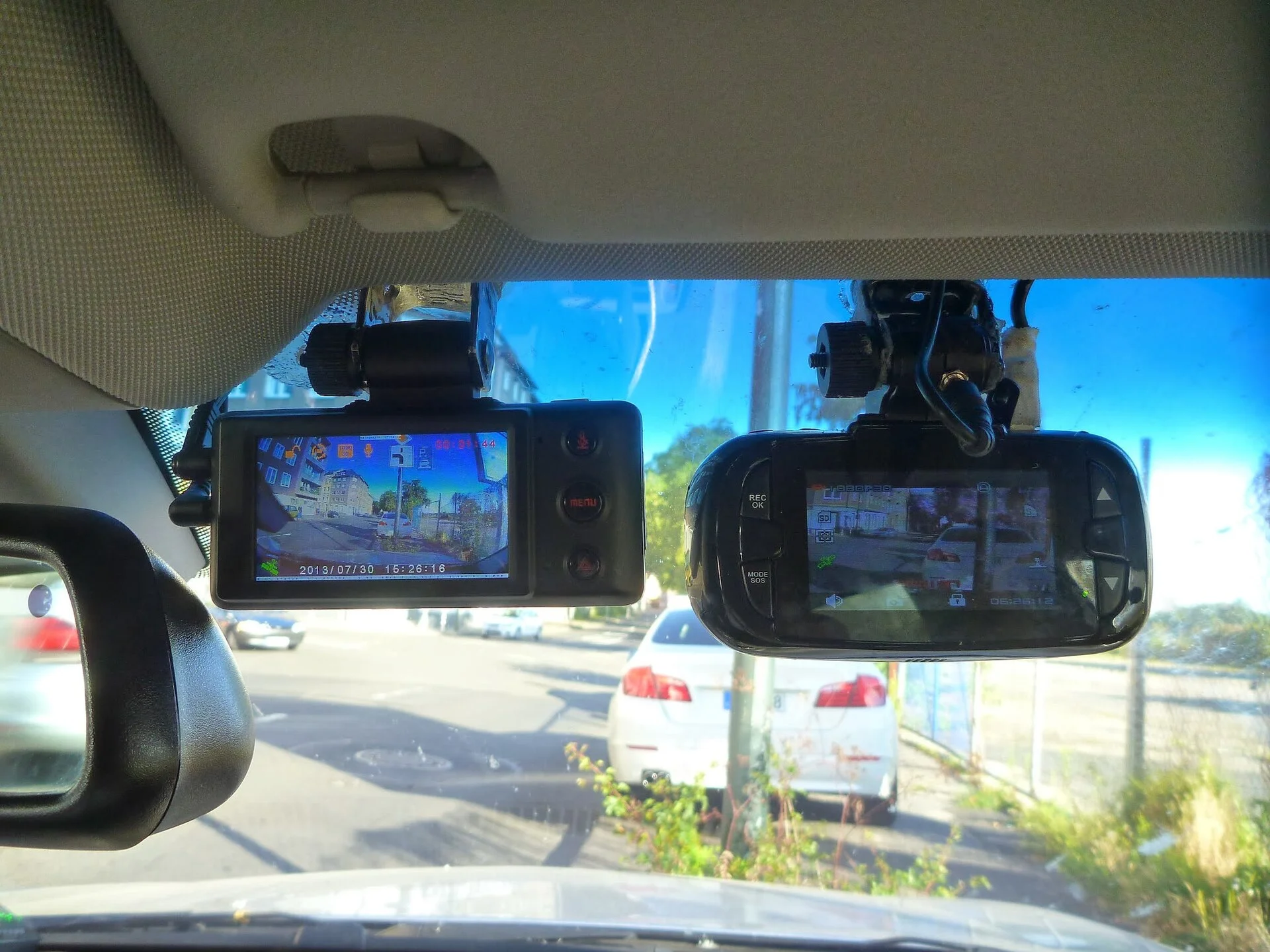
The most likely cause: a filmy windshield or a dirty lens
Before you assume the camera is broken, know this: the overwhelming majority of blurry dash cam footage comes from something on the glass, not something inside the camera. Dust, road grime, and the greasy haze that builds up on the inside of a windshield all sit directly in the light path, and a dirty lens or windshield is the first thing every troubleshooting guide tells you to rule out, per HitPaw's clarity guide. New cars are the sneakiest version of this - fresh interiors outgas a plasticizer film that fogs the inside of the glass for weeks, and it comes back after every hot day until the cabin finishes off-gassing.
The 5-minute check: clean the inside of the windshield in front of the camera with an automotive glass cleaner and a microfiber cloth, then gently wipe the camera lens itself with a dry microfiber cloth, avoiding harsh solvents that can haze the coating, as HitPaw and Omi both advise. If your footage sharpens up, you're done - and this is why I do it first, before touching a single setting. It costs nothing and it fixes more blurry-footage complaints than every other cause on this page combined.
Still on the box: peel the protective film off the lens
Here's the fix that embarrasses more people than any other, so check it before anything else physical: many dash cams ship with a thin peel-off protective film over the lens, and if you never removed it, every clip will look permanently soft and slightly milky. Look closely at the lens - a film usually has a tiny tab or a faint edge - and peel it if it's there. I've watched people RMA a perfectly good camera over a 2-cent sticker they never removed.
The same logic applies to anything between the lens and the road. If your camera sits behind a heavily tinted strip at the top of the windshield, or behind a ceramic-tint or paint-protection layer, that material softens and darkens the image; Omi lists placement behind tint as a real cause of a blurry, dim picture. Move the camera below the tint band, into the wiper's sweep zone so rain gets cleared on the outside, and re-check before you go deeper.
The diagnosis tree: 7 causes, worked in order
If cleaning and peeling didn't fix it, run the causes in likelihood order - each one has a distinct tell, so you can jump straight to yours:
- Milky/soft everywhere, all the time -> dirty glass or a peel-off film (causes 1-2 above).
- Soft only when moving, sharp when parked -> vibration from a loose mount.
- Evenly soft in every condition after cleaning -> a low resolution or bitrate setting.
- Fine by day, smeary at night -> that's not focus, it's the sensor's low-light limit.
- Hazy the first 10 minutes, then clears -> condensation inside the lens housing.
- Sharp on one side, blurry on the other, or focused on the dashboard -> the lens has physically shifted.
The first three are free. The next two are limits to understand, not faults to fix. Only the last one is hardware, and it's the only case where money enters the picture. Let me take them in that order.
Vibration blur: the fix is the mount, not the camera
If your still frames are crisp but anything in motion streaks, the camera is moving during the exposure. This is mechanical, not optical, so no amount of lens cleaning helps. The usual culprits are a suction mount that has lost its grip on a dusty or cold windshield, an adhesive mount that never fully bonded, or a power cable pulling on the body every time you hit a bump.
Clean the glass where the mount sits, press the mount firmly until it's genuinely locked, and route the cable so it isn't tugging the camera. Inspecting the mount before trips to make sure the camera is stable and not prone to shaking is standard advice in HitPaw's guide. A quick tell: park, tap the camera with one finger, and watch the live view settle. If it wobbles for a full second, the mount is loose. If your footage is not just soft but stuttering or dropping frames, that's a different problem - see our fix for footage skipping frames, which is usually the memory card, not the mount.
Settings blur: resolution, bitrate, and a fingerprint you missed
When the whole image is evenly soft in all conditions and the glass is spotless, look at the recording settings. Dash cams let you trade resolution for storage space, and a camera quietly left on a low or 'economy' setting records soft video to save card room. Set it to the highest resolution the camera supports - a 1296p camera left on a 720p economy mode throws away more than half its detail. HitPaw lists raising the resolution as a core clarity step, and higher resolution is exactly what helps you read a plate later.
One thing people forget: a greasy fingerprint left on the lens at install hazes the picture until it's wiped - Omi lists a dirty lens among the top causes of blurry footage. Before you blame firmware or settings, look at the lens under a bright light at an angle, because smudges hide until the light catches them.
Finally, check for a firmware update. Makers do ship image-processing fixes, and keeping firmware current can resolve known quality bugs, per HitPaw - but treat this as a last software step, after you've ruled out the glass, the mount, and the resolution setting. Software rarely un-blurs a picture that a clean lens didn't.
Night-only blur: that's the sensor, not the focus
Here's a distinction that saves people hours of pointless cleaning: if your footage is sharp in daylight but soft and smeary after dark, the focus is fine - you're seeing the image sensor's low-light limit. In the dark, a small or cheap sensor produces noisy, smeary video that reads as blur, and reading license plates at night is where it shows worst. VUEROID's teardown of plate-capture failures points squarely at lens optics and the sensor, not a broken focus, as the reason cheap cameras can't resolve a plate under streetlights.
There's no setting that fixes a hardware ceiling. What helps at the margins is a slower part of the road, a cleaner windshield (grime scatters headlight glare into a haze), and a camera whose maker actually publishes its sensor and aperture - an F1.8 lens gathers far more light than an F2.2 one. But if daytime is crisp and only night is soft, your camera is working correctly; you've hit the limit of what its sensor can do at 15 lux, and no amount of troubleshooting changes physics. The honest move is to stop fighting it and, if night plates are your whole reason for a camera, budget for one with a named low-light sensor next time rather than expecting a cleaning to conjure detail the sensor never captured.
The 10-minute haze: condensation inside the housing
If your footage is foggy or soft for the first 10 minutes of a cold or humid morning and then clears as the car warms up, you're not looking at a focus problem at all - it's condensation. Moisture has gotten inside the lens housing or fogged the windshield in front of it, and it burns off once the cabin heats past the dew point. Omi lists this moisture-and-clears pattern as a distinct cause worth separating from a true optical fault.
The fix depends on where the water is. Fog on the glass clears with the defroster and a wipe. Moisture sealed inside the camera housing is worse: it means the gasket is failing, and repeated fogging will eventually corrode the sensor. If the haze is inside the unit and keeps returning, treat it like the hardware failure below - it won't get better on its own, and a camera that fogs internally in month three is a warranty case, not a cleaning job.
One cheap stopgap while you wait on a warranty replacement: tuck a small silica-gel desiccant packet near the camera and run the defroster for the first few minutes of every drive. That pulls the cabin humidity down and buys you clear footage on the morning commute, when a fogged lens is most likely to miss the one incident you actually needed it for. It doesn't repair the seal - nothing short of a new housing does - but it keeps a compromised camera useful instead of blind until the replacement arrives.
The honest hardware failure: a focus that has drifted for good
Here's the one cause that isn't a quick fix, and I'd rather tell you straight than have you clean the same lens ten times. Most dash cams use a fixed-focus lens set at the factory. Over months of baking on a windshield that reaches 140 degrees Fahrenheit in summer sun, that lens element can loosen and rotate on its threaded mount, and the focus point drifts - often onto your dashboard instead of the road. A DashCamTalk owner documented exactly this on a VIOFO A119 V3 that went blurry over 2 years, with the focus shifted off the road entirely.
There are two honest paths. If your camera is out of warranty and you're handy, experienced owners in that same thread refocus the lens by carefully rotating its 12mm threaded barrel a few degrees while watching a live feed - a real fix, but a fiddly one that can void a warranty and isn't for everyone. If the camera is still under warranty, don't open it: a factory focus that has drifted is a manufacturing-grade defect, and the right move is a warranty claim or replacement, not a screwdriver.
When the focus is dead: the honest replacement path
Sometimes the refocus doesn't hold, the warranty has expired, or the housing has fogged internally - and at that point you're throwing good time after a camera that's optically done. This is the one place in this whole guide where the fix genuinely costs money, because you can't clean your way out of a lens that no longer focuses. If you're replacing, buy back the resolution you lost: a 1296p camera resolves noticeably more plate detail than plain 1080p.
A solid 1296p replacement like the 70mai M310 is the value pick I point budget-minded drivers to - it records 1296p QHD through a Sony sensor and pairs with a phone app, per 70mai's product page, for the kind of money that makes replacing a dead camera painless rather than a project. One honest caveat that ties back to why yours may have failed: like most cheap cams it runs on a small lithium battery, not a heat-tolerant supercapacitor, so park in shade when you can and you'll get more years before the focus drifts again.
Keep it from coming back: heat is the real enemy
Once you've got a sharp picture again, a little prevention keeps you off this page for good, because almost every permanent blur failure traces back to one thing: heat. A parked car's cabin can reach 140 degrees Fahrenheit on an 85-degree day, and that daily bake is what loosens a fixed-focus lens on its thread, degrades the adhesive on a mount, and cooks the small lithium cell inside a budget camera. The cheaper the camera, the faster heat wins - a lithium battery swells and fails in months where a supercapacitor shrugs it off.
Three habits do most of the work. Park in shade or a garage whenever you can, so the camera isn't sitting at 140 degrees for hours a day. Wipe the inside of the windshield every few weeks - the film that causes blur builds up gradually, so you never notice it creeping in until a clip looks soft. And keep the lens itself clean with a quick 30-second pass whenever you top up fuel. None of this costs money, and together they add years to a camera's sharp life. If your car has no shaded parking and cams keep dying on you, that's the one situation where paying up for a supercapacitor model genuinely pays for itself.
How to be sure you actually fixed it
Blurry-footage fixes fool people because a wipe looks like it worked until the next drive. Verify properly: after each change, record a short clip on a road where you can read a parked car's plate from about 15 feet, then play it back on a big screen, not the camera's 2-inch display. A phone or laptop screen reveals softness the tiny camera screen hides.
Compare a daytime clip and a night clip. If daytime is now sharp but night is still soft, you've fixed the focus and cleaning problem and what's left is the sensor's low-light limit - a hardware ceiling, not a fault, and the reason VUEROID points buyers toward better optics rather than settings for night plate capture. Knowing the difference stops you from chasing a 'fix' that doesn't exist.
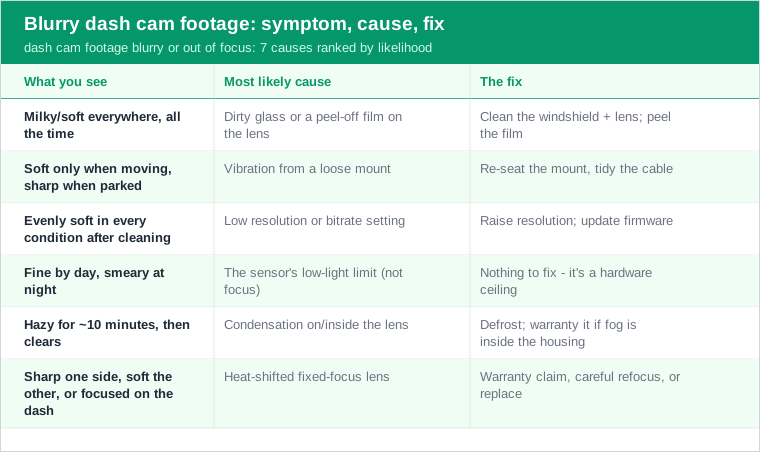
Quick reference: match your symptom to the fix
The short version, so you can act without re-reading:
- Milky/soft everywhere - clean the windshield and lens; confirm the peel-off film is off.
- Soft only in motion - re-seat the mount, tidy the cable (vibration).
- Evenly soft in all light - raise the resolution setting; update firmware.
- Blurry only at night - that's the sensor's low-light limit, not a fault.
- Hazy for 10 minutes then clears - condensation; defrost, or warranty it if the fog is inside the housing.
- Sharp one side, soft the other, or focused on the dash - the lens has shifted: warranty claim if covered, careful refocus if you're out of warranty, replace if it won't hold.
Nine times out of ten it's the glass or the lens, and it costs you a microfiber cloth and 5 minutes. Rule those out before you spend a dollar - and if your camera's real problem is that it won't turn on at all rather than filming softly, that's a separate diagnosis. A blurry backup camera follows the same logic; if that's what you're chasing, see the backup camera version of this fix.